How you think the a Perfect ZK App should be?

Hello Folks,
I opened this discussion here just to ask you something that for me is interesting.
What do you think a perfect ZettelKasten App should have?
- For example:
- I know that exists too much discussion about the perfect method, because there are people that defends the Folgettzel, Atomicity, etc.. And also, there are people that don't do it and prefers a more primitive version of ZK... However, nowadays with all technology. If you were to build some ZK app to store your notes, how you would like that to be?
- Would you think it should store only text, or should contain some functionality to upload images too?
- Would you think it should have atomicity or simply categorize each notes as if it was an archive system?
- Would you think it should hav tags, categories, or some type of identified the notes or simply respect the ZK essentials and treat each note as what it is.. "a note"?
- There are more questions I have, but they will come up down below in discussions...
I am wondering these things, because maybe ZK is not so popular as "mainstream". But it is still perfect for everyone who learn about this system. I have met people that haven't heard about this, and then they learned it and fell in love with the method haha.
How you think the best ZK App should be?
Howdy, Stranger!
Categories
- 3K All Categories
- 153 Research & Reading
- 706 The Zettelkasten Method
- 12 Knowledge Work
- 102 Writing
- 474 Software & Gadgets
- 159 Workflows
- 733 The Archive
- 15 Plug-In Showcase
- 88 Resolved Issues
- 225 Projects Logs and Journals
- 86 Project: Zettelkasten.de
- 53 Critique my Zettel
- 179 Random
- 375 Introduce Yourselves!
Comments
Only requirement for me are easy note writing (markdown format is perfect) and easy linking.
I consider obsidian a perfect fit, expecially for the second requirement, because it offers automatic update of links when note title changes.
A decent templating feature supports a lot, too, but for this you can also use an external text expander.
Oh, and being plaintext based and local availability, for future proof. My notes need to be usable for years, besides the lifetime of the app
My Zettelkasten is constantly changing, so I need an app that can keep up. I like Obsidian, because it adapts.
+1 to both of these.
More generally, beyond easy linking is ease in all operations, and the ability to quickly and easily scan related cards.
I've long been biased toward Devonthink. There are limitations. I wish I could transclude a Devonthink smart group (stored search) into a Markdown document like you can embed bases in Obsidian.
Obsidian would be more palatable if community plugins could be global across all vaults, but I think I understand why they aren't. Syncing.
For ease of entry and linking, it's hard to beat The Archive, for which I've gotten renewed enthusiasm over the past couple of months. Linking as searching does nice things, and I suspect The Archive is about as reliable as orbital mechanics. (No offense intended to flat earthers.)
IMO, a good note-taking app should provide stable note IDs and thus stable note links that don‘t change.
It‘s fine that an app is able to automatically update its (unstable) note links but ideally this shouldn’t be necessary. And such a setup still causes problems when using those links in external systems (say, in other apps like DEVONthink, Calendar, etc). These external links won‘t get updated when your note ID changes and as such turn into broken links.
Thank you very much for this response! It gives me a huge idea of what to do
Thanks!! That's helpful
Thanks!! That's cool, I will try to implemment all these stuff!
In my view the design style of one file for one note is unnecessarily limiting and produces much programming complexity. It makes things that should be easy, hard. Ideally, in my view of course, is that the entire data structure of notes and links should be resident in memory [1]. It's still a principle of major importance that all the content needs to be exportable as text, but that can easily be arranged when all the data is in memory and you have a good data model.
[1] In the old days of little memory and small disks, one note per file might have been a better approach.
While a note must not necessarily be contained in its own file, in my view it‘s crucial that the note is self-contained and that you can ensure that all note-specific info & metadata always travel with that note. As long as you can clearly associate the note‘s ID and metadata with the note and be able to separate individual notes again later, you should be fine w/o individual files. Purely block-based approaches (where you usually can associate an ID with the note block but nothing else) don‘t fulfill these requirements.
This topic was also discussed earlier here:
https://forum.zettelkasten.de/discussion/comment/5591/#Comment_5591
That comment was a follow-up comment to the below comment (which also touched upon stable note IDs and including the note ID in the note's body itself):
https://forum.zettelkasten.de/discussion/comment/5545/#Comment_5545
Btw, a one-note-per-file design must not be limiting, usually it‘s rather that our software is not designed to smartly handle this. E.g., it would be very useful if more tools could dynamically combine multiple notes/files as needed, like in a „Scrivenings“ mode:
https://forum.zettelkasten.de/discussion/comment/24621/#Comment_24621
In my own software, I‘ve implemented a kind of „Scrivenings“ mode where all selected notes get dynamically combined into one text view and you can copy & edit them as a whole. You can also drag this text of compound notes somewhere else, edit it there and then drag it back – the text will again be split into its individual notes and the corresponding note files will get updated automatically. This is all possible by having self-contained notes with note IDs being included in the note itself.
Yes, I completely agree.
With single note files the system has to keep opening and closing notes. If they are mapped to different locations, names, or other relationships, then the software has to keep track of and persist those mappings. Opening and closing many files for one operation is relatively slow, and has to be done over and over, unless they are to be cached; if cached why not keep the entire data set in memory from the start? Yes, whatever caching the OS happens to do helps, but in-memory is still simpler and faster.
Yes, I agree. If the system keeps the data in memory, there needs to be a simple and reliable way to serialize it to text in case one needs to move to another system. That's what I do.
That sounds very interesting. I get a somewhat similar effect by being able to open editing windows on several notes (one note per window) and dragging them into whatever spatial arrangement I like.
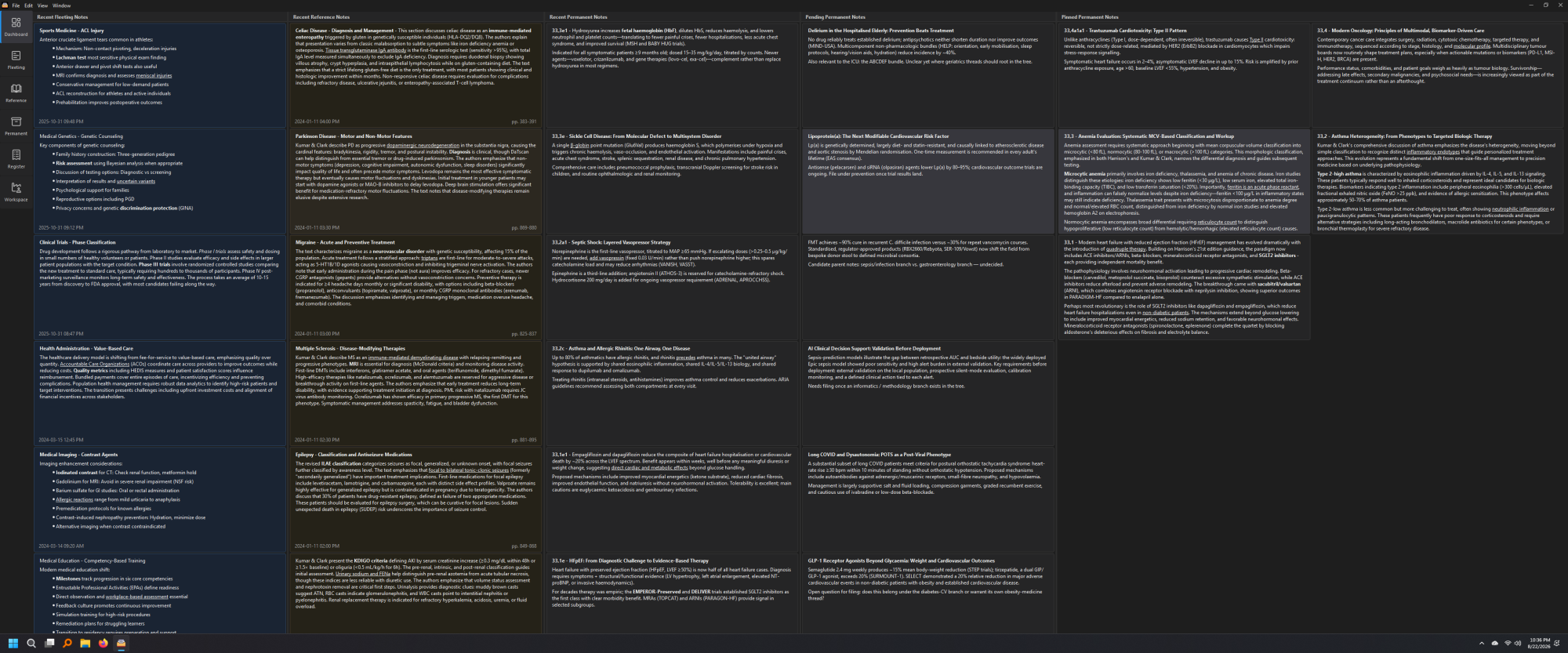
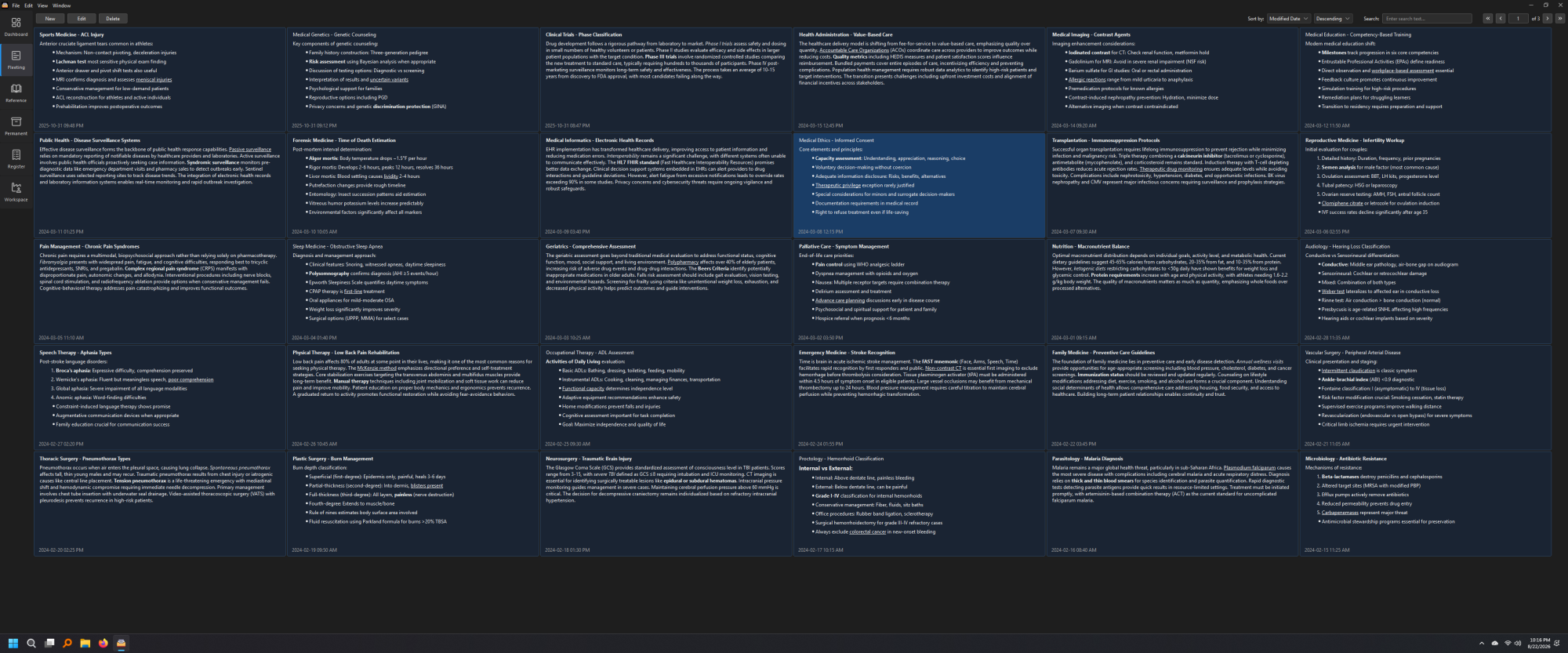
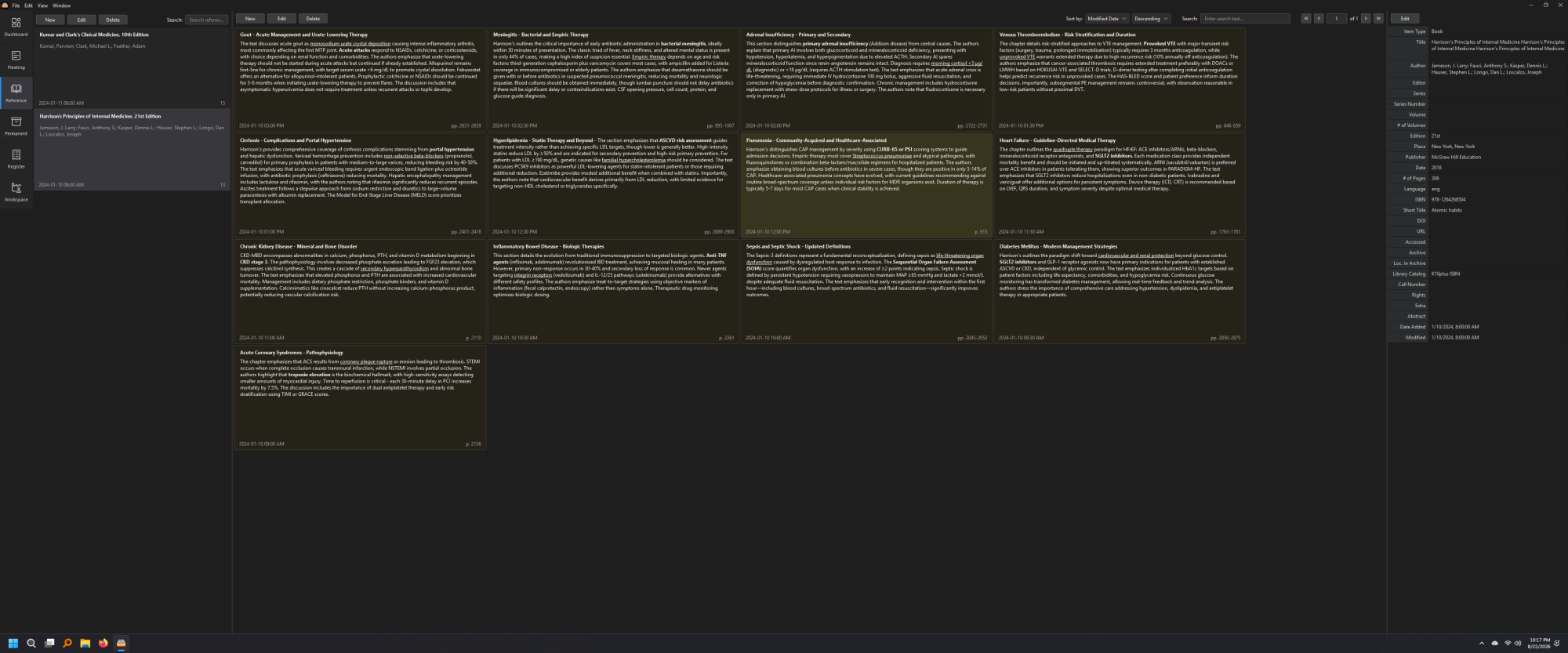
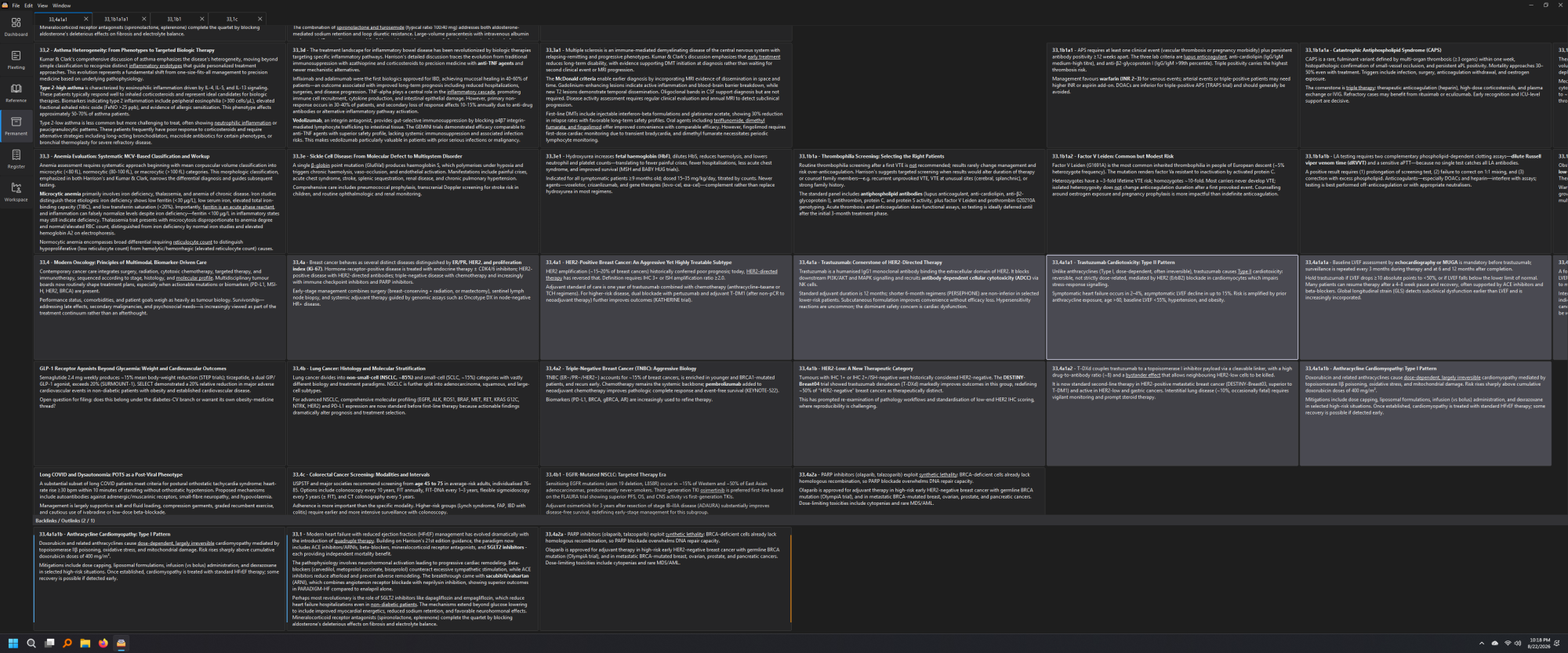
I have been using a Luhmann implementation of Zettelkasten through a custom (Slopped) windows application for the last couple of years. Alphanumeric IDs, atomicity, etc., are baked into the application itself. The register is a way to "tag" notes which will land me to specific area, so there is no concept of tags, categories, etc, and also need to to "tag" all notes in that specific area. I wanted to have each note behind another note so I could easily glance at all the surrounding cards while visiting a specific note. Though there is a thematic classification for all notes, just like Luhmann Zettelkasten. The app is not "perfect", but it works as I expected without getting lost in the Zettelkasten workflow.
Here are a few screenshots using sample medical notes. App has multiple problem, but somehow it's working for me.
Dashboard
Fleeting
Reference
Permanent
Register
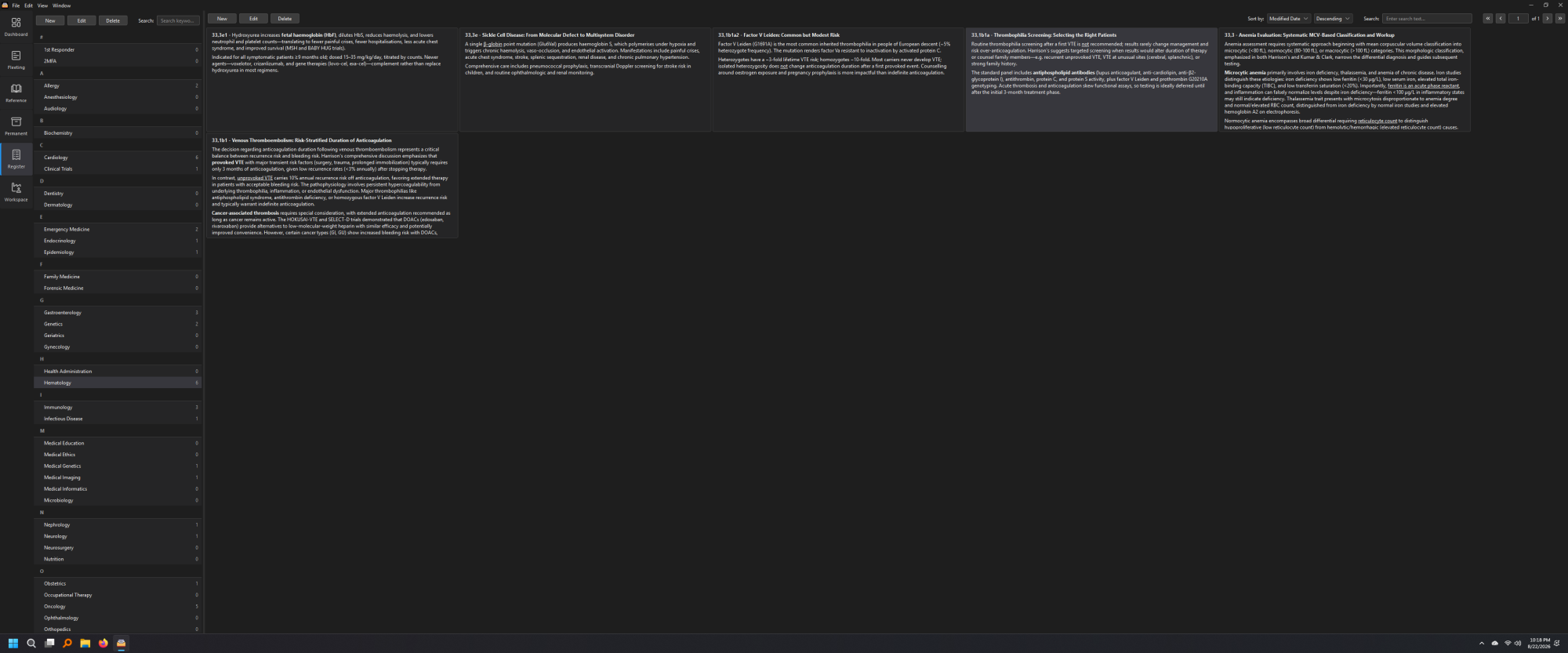
And yes - I use a 38-inch UltraWide monitor so I can see more notes at a time.
😆 That's a lot of notes per screen! I never wanted more than 1 note on my ultrawide, now I wonder how good your eyesight must be!
Author at Zettelkasten.de • https://christiantietze.de/
Not enough notes per screen! I’m trying to simulate the workflow of physical index cards, where I can lay out 20-30 related cards on the table at once, and see how they are connected, to make sense of them. I also have a “Zen” mode, where I can reduce the opacity of all other cards and keep only the current card and its related cards more prominent.
Simulating notes spread out on a table - yes! - that's important. That's very interesting, what you have done. I don't want to have that many because it's too hard to take in and keep in mind. More often I've had as many as half a dozen open at one time.
The notes in the spread don't have to be limited to being in the nearby ID numbers. There can be others that can join them.
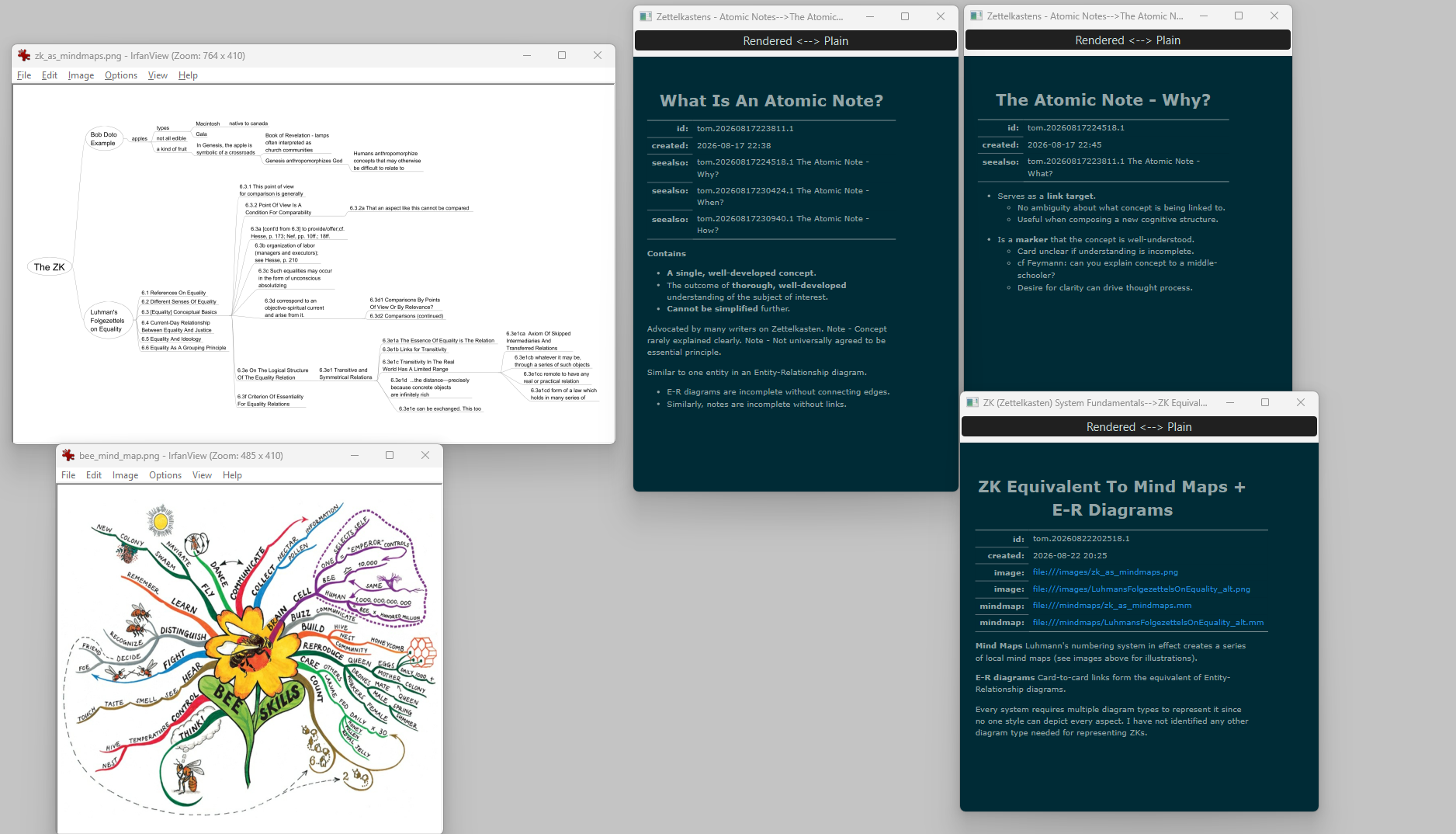
Don't be restricted to notes, though. I spread out graphics too, like mind maps. I also want to be able to alter the positioning because getting a good layout helps me to understand.
Here's an example of mine, with not too many items open. I use a second monitor, but it's not widescreen. Maybe it's time I get one...
Good idea. I think that a "perfect" ZK app should support seeing and arranging multiple zettels at the same time.
Some not perfect implementations I remember:
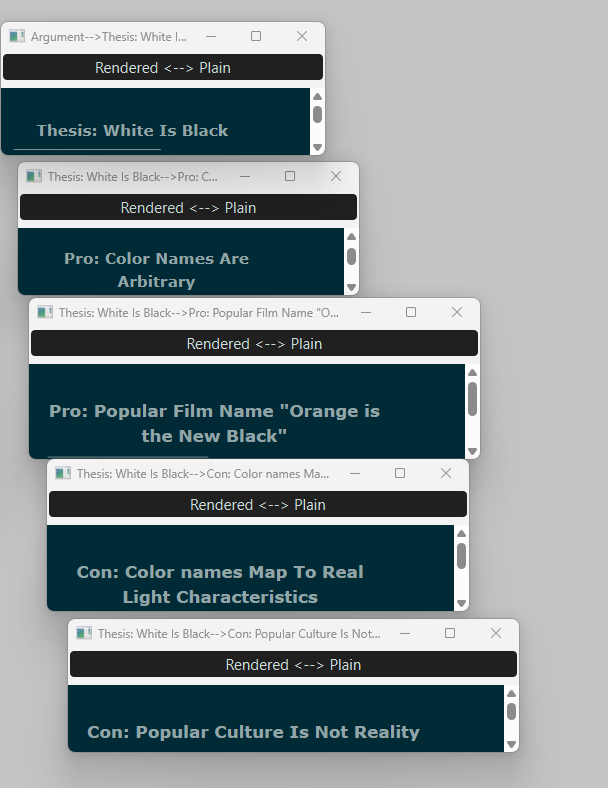
For many purposes, it's enough to see multiple titles laid out - if the notes have good evocative titles. Here's an example:
While the benefits of creating visibility of multiple notes seems to be clear, the opportunity costs appear to be uncovered.
I regularly compare working with ideas in the Zettelkasten with coding. There is boilerplate code, holding multiple objects in your mind, developing an intuitive internal map of a strange Platonic landscape, etc.
I experienced a huge training effect on my mind when I could work multiple sessions just in my Zettelkasten. But as I am using The Archive, I just see one note at a time. But when I am fully immersed in the world of ideas, I can navigate the strange mental landscape with relative ease.
So, it might be that having the notes available in sight might also remove a training opportunity for the mind.
The counterpoint to that is the same as any tool: Is there a problem when you use your tool to multiply the results of your effort, instead of leaning back and reducing your effort?
I think not having the ideas visible to you forces your mind to engage your long-term working memory (term by Eric Anderson https://pubmed.ncbi.nlm.nih.gov/7740089/) more. At least, this is what I determined to be part of the mechanism of the training effect that I experienced.
I am a Zettler
That is the case for some people but not by any means all, including me. Of course, the longer and more intensely one gets engaged with a subject the more gets internalized. however we have to get from here to there.
Think of how your mind pieces together a visual scene. It feels like a continuous unified whole, but in actuality your eyes are constantly darting around, refreshing one small patch after another especially the ones that seem the most salient. This is the saccade.
I call the equivalent for mental processes a "mental saccade". Having notes, diagrams, etc., all visible at the same time combines both mental and visual saccades.
That was said to be Socrates's argument against using writing but here we all are, writing and reading all the time.
Have you heard about the extended mind thesis? It examines the relevance of externalization.
Having so much information visible also facilitates pattern recognition and navigation. Here's a visual experiment using 30+ zettels from Luhmann's ZK II 7/25a branch. I get a sense of structure and orientation from such a visualization.
Yes, and I have been admiring the various examples you have posted showing Luhmann's zettels laid out in their threads.
Tony Buzan, in connection with mind maps, emphasized the point that visual bandwidth is much greater than textual, which is one reason why graphics and diagrams can be so effective.
I tend not to go along with the idea literally. I will agree that external objects can act [1] as if they are extensions of one's mind, and so the effect is much the same as if it were literally the case. The reputed Chinese proverb comes to mind: "The palest ink is stronger than the strongest memory".
[1] in a loose manner of speaking.
I wasn't speaking about an individual idea per se, but also about the ability to hold on to ideas in your mind and manipulate them. It is roughly the same direction as Cal Newport goes with productive meditation:
And he was right. A common fallacy is to point out that all previous generations warned about X. The implied conclusion is that they were wrong. However, to this day, I am yet to encounter a generational warning that doesn't have more than just a kernel of truth.
Technology improves our capacity to do X. We have the choice of achieving X with less effort, thereby detraining the less stressed system, or keep the effort (or perhaps even increase it) and achieve more.
Being able to focus on a problem, a single idea, or whatever without any external aids (like visible notes) is a skill that transfers to situations in which you have external aids. Part of the mechanism is that you don't need to refresh your memory by looking at a note but can continue your thinking process without this micro action.
These necessary micro actions add up and make the difference between a fluid or a clunky feeling. My go-to example is Amazon's latency study strangely. A sample application to knowledge work is the Friction Fallacy.
This is the reason why one of the major objectives is to move as many processes into your mind because here you have the speed advantage. There are a gazillion examples from all kinds of domain where this pattern applies. (It is better, for example, to have fewer long-hours working engineers than to have more short-hours working ones because you can reduce the number of friction points like mind-word-mind translations; instead of people have to coordinate thinking, the thinking stays for longer in the individual engineers mind without the need of translation)
I am a Zettler
Woow!! That seems very interesting! I mean, it is an app made by your way of storing notes and that's actually perfect!
I love that!
I think the key distinction is between storing / visualizing zettels and actually composing thoughts from multiple zettels. A “perfect” ZK app would let you have several zettels visible at once and manipulate them as independent thought units-moving, grouping, comparing, connecting, and rearranging them to develop new ideas. Canvas, graph views, outliners, file navigators, etc. each solve part of this, but none fully treats the zettels themselves as objects for thought composition.
Probably the thesis fits Zettelkasten really well! If external tools can become part of our cognitive process, then a ZK system could be seen as an extension of memory and thinking, not just a place to store notes. That makes the ability to see, arrange, and manipulate multiple zettels at once especially interesting.
I'm not speaking of generational truths. I'm speaking about tradeoffs and cognitive limitations.
So your eyes don't need to perform saccades? You could train them to be more efficient and then you could take in each scene more quickly and with less effort?
Yes, sure. A tennis player can't be looking at the training manual for each shot. I imagine we all recognize that. I'm a pilot, I don't thumb through the handbook during each maneuver. I also use checklists, and I hope my surgical team in-theater does the same.
Again, I'm sure we all recognize this. There is such a thing as channel capacity, though. A given communications channel that has some noise has a limit to the rate at which it can communicate information. Above that limit errors degrade the transmitted information. Good engineering can let a actual channel approach its limit more closely but the limit is still there. Error-correcting coding can correct some of those errors but the extra bits still decrease the information rate.
We are lucky in that we (being adaptable organisms) have some ability to raise some limits through training and repetition. You may be able to help me increase my ratio of fast twitch to slow twitch muscles but I will never match up to Usain Bolt in a sprint. I see that you must be the Usain Bolt of the mental scene, but I'm not. OTOH, Usain Bolt might not be the best person to choose for a 10km race...
I don't use a slide rule anymore. No one does. Yet using a slide rule taught a crucial skill: you had to learn how to estimate the answer because the slide rule would not tell you the order of magnitude, and also because you might make a mistake in manipulating it. The slide rule was a great trainer for number intuition and mental math.
With a calculator you don't get to learn those things. When the inevitable mistake happens, people who didn't have to use a slide rule often don't realize it. I know a smart teenager who had to pull out his phone when he wanted to make change. (I only have a dumb phone, BTW).
So we should make those fewer engineers work 14 hour days, day after day? Won't that make them even more productive? We both know the answer: body and mind can't adapt that far.
I'm not denigrating anything you have suggested here, including that training can increase capacity. I am saying that it's wise to take into account the known working and limitations of humans, and design to work with them and not against them.
Typical drawing programs let you group drawing objects together, and to move, scale, and style them as a unit. That functionality that would be useful here.
As always, automated layout is hard.
I will also add my favorite Gingko Writer to this list. The app is unfortunately deprecated and hasn't been updated for the last six years.
Attempt to experimenting with Gingko using Luhmann's zettels (17.1b1):
You can find the high-resolution screenshot on Imgur.
Nice! I haven't seen this app or this kind of layout before. Thanks for sharing.
Love it! This is the best digital layout and interaction pattern for Folgezettel I have seen so far.
Unlike nested lists it doesn't interrupt higher level note sequences. The layout is predictable because it uses simple rules. And it shouldn't be too difficult to implement that layout in a "perfect" ZK app because it is based on simple columns.
It's not deprecated but it's been undergoing rapid changes, mainly to the online browser version. That version is a subscription product - see
https://gingkowriter.com
It's worth going to that page because it has an animated demo showing how you can move related groups of cards (yes, they call them cards) around as a group.
The desktop versions have barely been touched since 2021. Supposedly they will get around to updating the desktop version, but since its currently freely available who knows? There are variants for Windows, Mac, and Linux. In fact, who knows if the Mac version will even run on today's Mac OS versions? The repository on GitHub is at
https://github.com/gingko/client/tree/desktop