Zettelkasten Forum


Understand Zettelkasten Essentials

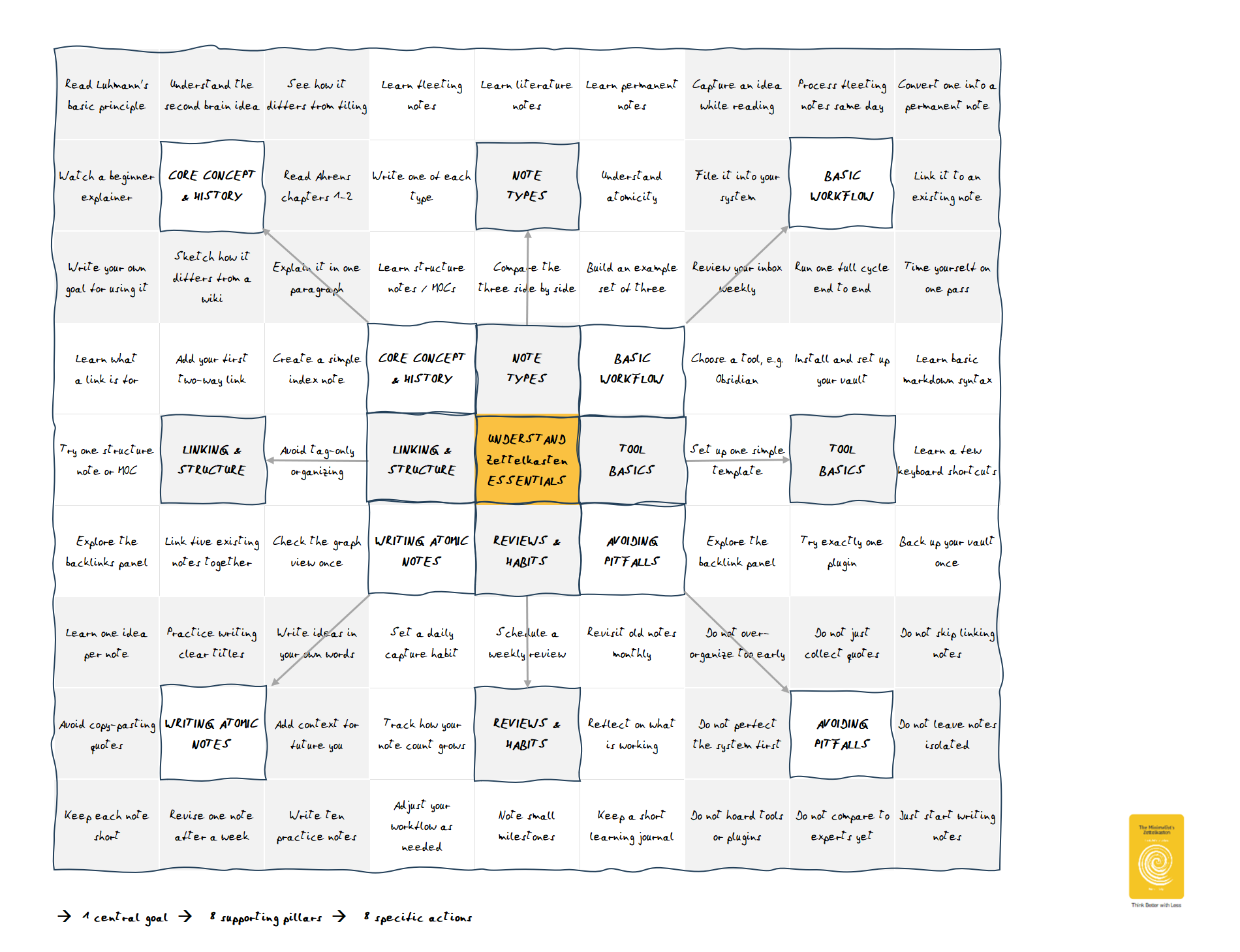
It starts with a clear plan. The Harada Method [1] shows you how to turn your goal into concrete steps. Instead of getting stuck at the initial stage, your goal is systematically broken down into 64 specific actions.

This turns your idea into an actionable plan with daily habits:

  • Structure your goal (1 central goal).
  • Reduce complexity (8 supporting pillars).
  • Define actionable steps (8x8 specific actions).

Reference
[1] Harada, Takashi, and Norman Bodek. The Harada Method the Spirit of Self-Reliance. PCS Press, 2012.

Edmund Gröpl — 100% organic thinking. Less than 5% AI-generated ideas.

Comments

  • @Edmund I like that chart! Haven't seen it before, but clearly it has high potential.

  • edited July 31

    Interesting idea to use Shohei Ohtani's version of Harada's Open Window 64 chart in this way. The chart makes sense to me as a mnemonic device that uses a 9x9 grid for loci.

    Personally, I prefer the version in Harada's book. It merges the nine center boxes into one.

    Here's how the chart would look as a simple HTML table, that can be directly included in a Markdown file. I think it works well, even without custom styling.

    Read Luhmann's basic principle Understand the second brain idea See how it differs from filing Learn fleeting notes Learn literature notes Learn permanent notes Capture an idea while reading Process fleeting notes same day Convert one into a permanent note
    Watch a beginner explainer CORE CONCEPT & HISTORY Read Ahrens chapters 1–2 Write one of each type NOTE TYPES Understand atomicity File it into your system BASIC WORKFLOW Link it to an existing note
    Write your own goal for using it Sketch how it differs from a wiki Explain it in one paragraph Learn structure notes/MOCs Compare the three side by side Build an example set of three Review your inbox weekly Run one full cycle end to end Time yourself on one pass
    Learn what a link is for Add your first two-way link Create a simple index note UNDERSTAND
    Zettelkasten
    ESSENTIALS
    Choose a tool, e.g. Obsidian Install and set up your vault Learn basic markdown syntax
    Try one structure note or MOC LINKING & STRUCTURE Avoid tag-only organizing Set up one simple template TOOL BASICS Learn a few keyboard shortcuts
    Explore the backlinks panel Link five existing notes together Check the graph view once Explore the backlink panel Try exactly one plugin Back up your vault once
    Learn one idea per note Practice writing clear titles Write ideas in your own words Set a daily capture habit Schedule a weekly review Revisit old notes monthly Do not over-organize too early Do not just collect quotes Do not skip linking notes
    Avoid copy-pasting quotes WRITING ATOMIC NOTES Add context for future you Track how your note count grows REVIEWS & HABITS Reflect on what is working Do not perfect the system first AVOIDING PITFALLS Do not leave notes isolated
    Keep each note short Revise one note after a week Write ten practice notes Adjust your workflow as needed Note small milestones Keep a short learning journal Do not hoard tools or plugins Do not compare to experts yet Just start writing notes
  • edited July 31

    @harr said:
    Interesting idea to use Shohei Ohtani's version of Harada's Open Window 64 chart in this way. The chart makes sense to me as a mnemonic device that uses a 9x9 grid for loci.

    Personally, I prefer the version in Harada's book. It merges the nine center boxes into one.

    Here's how the chart would look as a simple HTML table, that can be directly included in a Markdown file. I think it works well, even without custom styling.

    Great idea to use HTML. It's also easy to add links to relevant web pages:

    Read Luhmann's basic principle Understand the second brain idea See how it differs from filing Learn fleeting notes Learn literature notes Learn permanent notes Capture an idea while reading Process fleeting notes same day Convert one into a permanent note
    Watch a beginner explainer CORE CONCEPT & HISTORY Read Ahrens chapters 1–2 Write one of each type NOTE TYPES Understand atomicity File it into your system BASIC WORKFLOW Link it to an existing note
    Write your own goal for using it Sketch how it differs from a wiki Explain it in one paragraph Learn structure notes/MOCs Compare the three side by side Build an example set of three Review your inbox weekly Run one full cycle end to end Time yourself on one pass
    Learn what a link is for Add your first two-way link Create a simple index note
    UNDERSTAND
    ZETTELKASTEN
    ESSENTIALS
    Choose a tool, e.g. Obsidian Install and set up your vault Learn basic markdown syntax
    Try one structure note or MOC LINKING & STRUCTURE Avoid tag-only organizing Set up one simple template TOOL BASICS Learn a few keyboard shortcuts
    Explore the backlinks panel Link five existing notes together Check the graph view once Explore the backlink panel Try exactly one plugin Back up your vault once
    Learn one idea per note Practice writing clear titles Write ideas in your own words Set a daily capture habit Schedule a weekly review Revisit old notes monthly Do not over-organize too early Do not just collect quotes Do not skip linking notes
    Avoid copy-pasting quotes WRITING ATOMIC NOTES Add context for future you Track how your note count grows REVIEWS & HABITS Reflect on what is working Do not perfect the system first AVOIDING PITFALLS Do not leave notes isolated
    Keep each note short Revise one note after a week Write ten practice notes Adjust your workflow as needed Note small milestones Keep a short learning journal Do not hoard tools or plugins Do not compare to experts yet Just start writing notes

    My first idea was to use MS Excel for Harada's Open Window 64 chart. However, HTML could enhance collaborative work within the forum.

    Edmund Gröpl — 100% organic thinking. Less than 5% AI-generated ideas.

  • Incidentally, aside from YAML properties or however one writes digital Zettln, the HTML form is an example of a structure note, in @Sascha's sense.

    Zettel GitHub. Zettel Wiki Erdős #2. Problems worthy of attack prove their worth by hitting back. -- Piet Hein. PROBLEMS. Grooks, 1966. CC BY-SA 4.0.

  • @ZettelDistraction said:
    Incidentally, aside from YAML properties or however one writes digital Zettln, the HTML form is an example of a structure note, in @Sascha's sense.

    Exactly. :)

    I am a Zettler

  • edited August 1

    @Edmund said:
    My first idea was to use MS Excel for Harada's Open Window 64 chart. However, HTML could enhance collaborative work within the forum.

    I like HTML in my personal notes for similar reasons. The content is accessible by full-text search. The links are accessible for backlink search and command line tools. Version control is much easier, because it's just text. And the files are smaller.

    In Obsidian I enjoy tinkering with CSS. This is how the chart looks like in my zettelkasten. The colors are inspired by the Harada/Bodek book:

    PS: Nice workaround with the <small> tags! It makes the chart much more readible in the forum.

  • @harr, I've been impressed by your custom CSS examples that I've seen in the forum. I would love to see more whenever it's relevant.

  • The CSS is good. The links are missing.

    Zettel GitHub. Zettel Wiki Erdős #2. Problems worthy of attack prove their worth by hitting back. -- Piet Hein. PROBLEMS. Grooks, 1966. CC BY-SA 4.0.

  • @Andy said:
    @harr, I've been impressed by your custom CSS examples that I've seen in the forum. I would love to see more whenever it's relevant.

    Thanks!

    @ZettelDistraction said:
    The CSS is good. The links are missing.

    Thanks! The links are formatted as normal text. In my local system are discoverable on mouse-over. I find it easier to read.

  • @harr said:

    @Edmund said:

    I like HTML in my personal notes for similar reasons. The content is accessible by full-text search. The links are accessible for backlink search and command line tools. Version control is much easier, because it's just text. And the files are smaller.

    In Obsidian I enjoy tinkering with CSS. This is how the chart looks like in my zettelkasten. The colors are inspired by the Harada/Bodek book:

    PS: Nice workaround with the <small> tags! It makes the chart much more readible in the forum.

    I wouldn't do it that way. I would create a mind map instead, and put a link to it into the card. I would also serialize the mind map into an indented list and put that into the card. For each main branch of the mind map/list, I would create a child card. For each one of these cards' branches I cared enough about I would create another child card for it.

    I don't see much value in being able to search for individual box labels. If I can remember enough to search, I already know what it says well enough. If not, I can't run a search anyway. Better just to navigate to the parent card and look at the graphic.

    Here is a quick stab at a mind map.
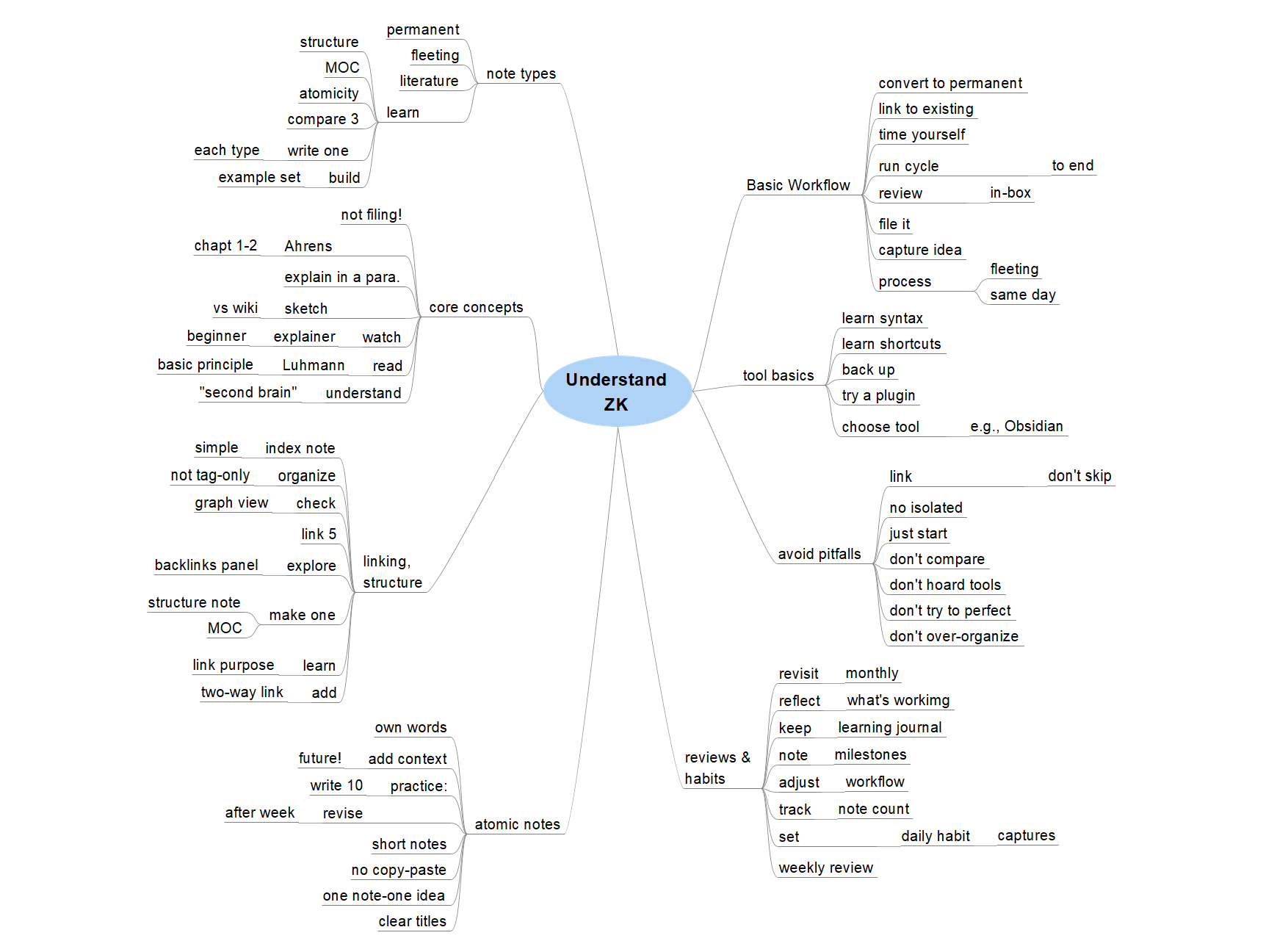
    I'm not too clear about the purpose of this chart. Is it advice to newcomers, recommendations for daily practice, preaching about workflow, something else? It doesn't seem to represent an atomic idea.

  • edited August 1

    @tomp said:
    I'm not too clear about the purpose of this chart. Is it advice to newcomers, recommendations for daily practice, preaching about workflow, something else?

    I read it as a teaching tool. It works for me, because it provides a fixed spatial layout with a simple gestalt. As a teacher I can point at stuff. As a student I can check off progress.

    But I also understand the confusion, because other sources describe that chart type as a creativity tool.

    BTW, I learned that the chart type in @Edmund's initial post is older than Harada's method.

    Apparently it was developed in 1979 by Yasuo Matsumura and marketed under the name "Mandala Chart". It seems that the name is registered (in Japan?). At least that's how I understand the website https://mandalachart.jp with the help of Google Translate. They even have an "official" app.

    There are many templates available online for Mandala Charts. Some use other names like "Lotus blossom".

    Apparently the famous Japanese baseball player Shohei Ohtani filled out such a Mandala Chart while he was still in high-school. I haven't checked it myself, but the biopic Beyond the Dream supposedly features it.

    I don't know if Harada developed a similar chart independently, or if he had been familiar with the Mandala Chart.

    The differences are subtle. One unfolds a smaller 3x3 chart into a larger 9x9 chart, the other collects 64 specific actions. Not sure if the difference really matters for practical applications. Maybe this is just a legal thing, where the same idea is sold with a small twist under a different name.

    I don't know if this chart is the final answer for making sense of zettelkasten, but I appreciate the idea. It's also an example where artificial constraints (fixed grid vs organic branching) can increase creativity.

  • @harr said: It's also an example where artificial constraints (fixed grid vs organic branching) can increase creativity.

    Yes, that's the main reason why I chose this chart type.

    Otherwise, I would have chosen my preferred concept map ;-)

    Edmund Gröpl — 100% organic thinking. Less than 5% AI-generated ideas.

  • edited August 1

    @harr said:

    @ZettelDistraction said:
    The CSS is good. The links are missing.

    Thanks! The links are formatted as normal text. In my local system are discoverable on mouse-over. I find it easier to read.

    No mouse-over on my end. I see it was a jpeg.

    Post edited by ZettelDistraction on

    Zettel GitHub. Zettel Wiki Erdős #2. Problems worthy of attack prove their worth by hitting back. -- Piet Hein. PROBLEMS. Grooks, 1966. CC BY-SA 4.0.

  • @harr said:
    I don't know if this chart is the final answer for making sense of zettelkasten, but I appreciate the idea. It's also an example where artificial constraints (fixed grid vs organic branching) can increase creativity.

    I don't see that at all. The grid boxes one in with no room to put anything new. The mind map invites extending and adding to the ideas. Other branching formats should do the same.

Sign In or Register to comment.