AI-Augmented Zettelkasten

The approach to using LLMs alongside the Zettelkasten method is controversial and most people have different opinions about that. I'm a "pro-AI" in that sense with some caveats:
- I am OK with a cyborg approach. No querying some question and pasting that onto a new note or finding connections solely based on LLMs.
- I see using LLMs in the learning phase. You may not like learning from LLMs directly, I like it. I mainly use LLM-based learning for quick definition checks and evaluating my inferences in the beginner phase. I also should indicate that I use my vault mainly for academic research. Academic research if the area is heavily complex requires too much time passes with engagement for learning purpose. It helps if you want tangible output in the learning phase. I don't delete my thinking notes.
- I am trying to achieve a state of not starting with a blank slate. You should add your organic thinking process on top of what you yield from LLMs. Engagement with the vault without LLMs is required.
Here are the skills I use in Claude Code for reading and research:
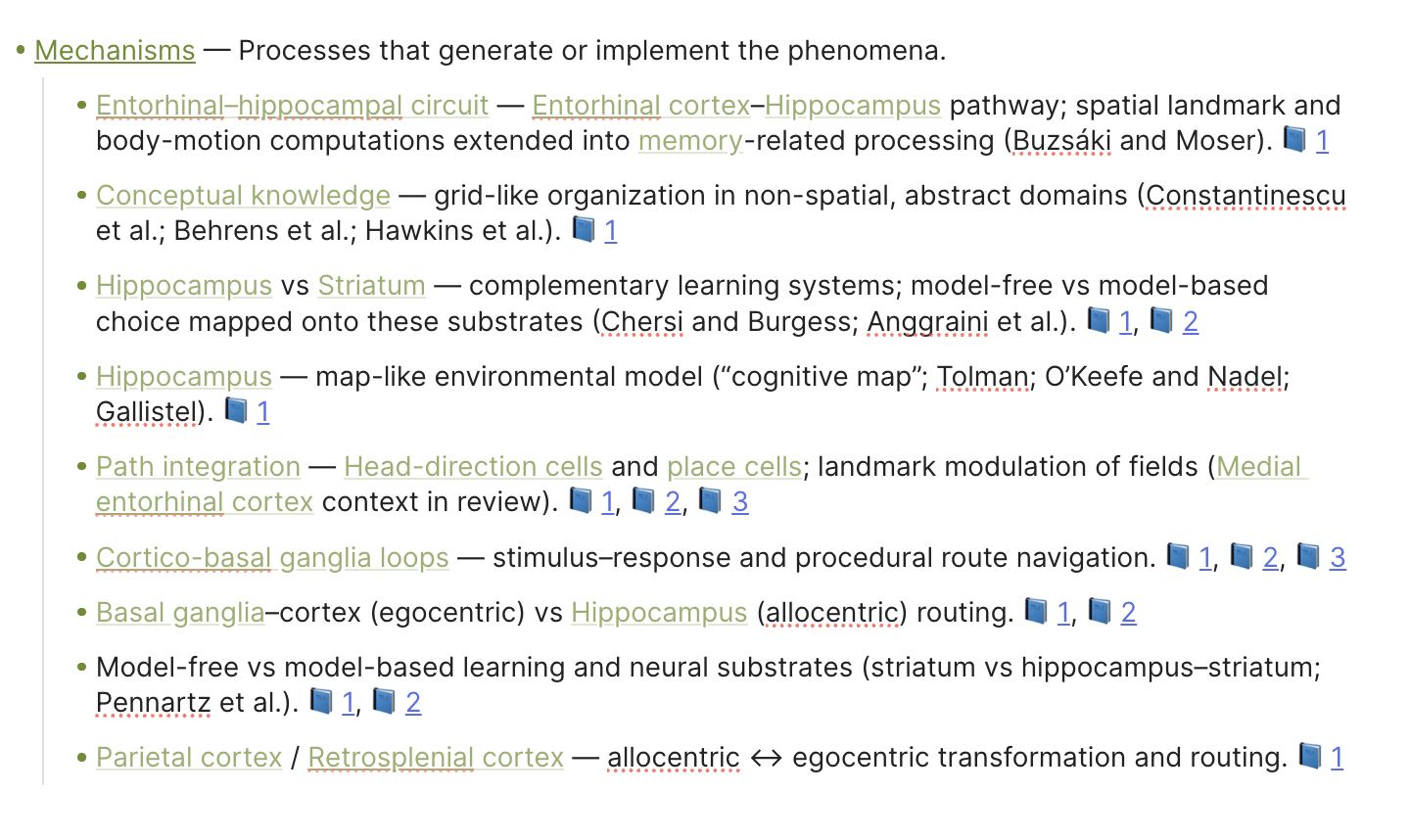
- process-paper — Takes a paper you've already highlighted and turns it into a hub note (summary of the paper) plus a set of atomic notes, one per key idea. Nothing gets invented — only what's in the highlights.
This is the output I get from this skill showing only the mechanism part. There are other ontology types I created. Sometimes I batch read articles and I use this part as a table of content for quick reference if I don't find enough time to go through the whole paper.
find-papers — Reads a note in your vault and searches for real academic papers closely related to it. Returns full citations with links.
review-literature — Builds a reading list by looking at a topic from three angles at once. It treats complex research projects as A intersects B, gives papers on A, B and the intersection listed in increasing complexity.
research-project — Creates a structured research project note with a "What I already know" section and a reading list. Separates sources you've processed from concepts you've only encountered but creates a starting point.
The remaining two are more controversial.
write-zettel — Writes a new atomic note (one idea, one file) following the vault's rules. The title is always a claim, not a topic. Keeps notes short and plain. It only writes a WHAT layer. I do it because it nudges me towards writing more.
related-notes — After every response you get from the terminal, appends a footer listing vault notes relevant to what was just discussed. Keeps the note graph connected over time. I don't get the rationale of the connection directly from Claude. Again, I think it nudges me towards creating more because the connections I get are very primitive ones. I can further add my own leverage any time.
Plus, I treat LLM-query outputs selectively. I mainly paraphrase, rarely copy-paste.
I was using Cursor since I bought an annual pro account but switched to Claude Code in Obsidian. I am creating hot keys and it became a mousepad-free tool where I can get into flow easier.
With Claude Code, I save something as skill any time I think it can be reused.
Selen
Howdy, Stranger!
Categories
- 3K All Categories
- 153 Research & Reading
- 703 The Zettelkasten Method
- 12 Knowledge Work
- 102 Writing
- 474 Software & Gadgets
- 158 Workflows
- 733 The Archive
- 15 Plug-In Showcase
- 88 Resolved Issues
- 225 Projects Logs and Journals
- 86 Project: Zettelkasten.de
- 53 Critique my Zettel
- 179 Random
- 375 Introduce Yourselves!
Comments
I think that learning from LLMs is a bad idea, because they hallucinate too often.
Learning with LLM works well for me. They are great analytical tools and they can provide valuable hints.
I don't see any value in filling my ZK with AI slop. I think of my ZK as a quality controlled environment: only content from verifiable sources.
If you think LLMs hallucinate and you can't understand or prevent it, you don't know how to work with them.
I don't think it is AI slop. My workflow for reading multiple papers at the same time really became way more faster.
Nothing in the skills I provided directly uses LLM output directly. It's just a built-in NotebookLM pipeline.
Have you read my post?
Selen
Plus, what's the point in coming and saying "Nah, this is bad." without giving any reasons that can foster a discussion environment? What can I do with your liking?
Selen
Did I misread your post?
Did you read my post? I gave you a reason: unpredictable quality of the LLM's output.
If you have figured out, how to avoid any kind of hallucination in your pipeline, I'd love to learn how you did it.
Like I said, process-paper organizes keywords that are in your highlights especially helpful if you read multiple papers and e.g. look for entorhinal cortex from papers that are not directly talking about them so you are not directly processing that particular part because it takes too much time. Create the "entorhinal cortex" note, check for backlinks. There appears what you already have about entorhinal cortex.
Write zettel - Yeah, this one is controversial. I like to add one or two sentence elaboration of the zettel. Ngl.
Research project - Creates a reading list (I create ALL my reading lists with LLMs, with semantic search to be more diligent, at least for beginning. Then what you should read emerges.) and lists what you already have. Time consumption advantages.
Plus I think it provides a gamified experience, a conversation partner. Hallucination part comes from this perspective.
I don't copy-paste things. I generally challenge ideas. I have a hard time thinking through something Q&A form and engaging with an existing material nudges me towards thinking.
I see LLM as an opportunity to advance. These are practices I adopted for a week right now and wanted to discuss opportunities.
Selen
@c4lvorias: Thanks for sharing this; I learned a lot from it, since I don't do LLM augmentation of my note system yet. I mostly agree with your ranking of LLM actions from least to most controversial, except for the "related-notes" action, which has been available in (a different form in) DEVONthink (app) for more than two decades. I can see myself using some of the less controversial actions if I had a tight deadline and needed to work faster.
Do you keep a log of your use of these actions?
No, but I know what it creates. It's either research project note, literature or a TOC. I don't think I need tracking since I only allow processed material other than that. It's also related to my citation convention. Maybe I can think more about that...
Glad that it helped.
Selen
@c4lvorias this sounds like a great workflow! Would you mind sharing the instructions for the skills?
Interesting question.
I consider LLM created content inferior to fact-checked content. Mixing it with controlled content confuses my brain. :-)
My solution to storing LLM generated content in the ZK was to keep it clearly separated.
In Obsidian I currently use custom callouts for content that I paste manually from LLM. I call them "AI" and use a small robot as icon. :-)
I don't programmatically add LLM content yet. If I did, I'd store it as clearly identifiable structured data in YAML frontmatter. For example write-zettel could fill two properties ai-title and ai-elaboration.
Other options might be clearly identifiable sections/callouts in a note or maybe even a separate note type.
Where do you store your notes? Are you using NotebookLM as your primary note-taking tool?
In my experience the choice of tools has a strong effect on the process. If you're working "AI first"—ie you're embracing NotebookLM and Claude with all their bells and whistles—you might not need the Zettelkasten method at all. Or only for particular aspects of your workflow.
The idea is to change the perspective. What you're interested in might not be an "AI-Augment Zettelkasten", but:
"How can I augment my AI workflow with Zettelkasten?"
I am not using NotebookLM. I meant my workflow works like NotebookLM, to find the existing information and reference that. Please see:
Like I said, process-paper organizes keywords that are in your highlights especially helpful if you read multiple papers and e.g. look for entorhinal cortex from papers that are not directly talking about them so you are not directly processing that particular part because it takes too much time. Create the "entorhinal cortex" note, check for backlinks. There appears what you already have about entorhinal cortex.
We are not communicating because I don't think you are engaged in a literature review like my screenshot above. It's my guess.
I don't use anything like that when reading books.
Academic papers require direct citation. They are dense. They mention multiple concepts/things in one paragraph so you have to distribute the info to start engaging with the material.
This workflow helps in distribution. After acquiring an organized file, let's say for a cell type, you can work with that information in the traditional sense.
Edit: I should also highlight that I don't create atomic notes directly from the source file trying to embrace Sascha's constructive mindset.
Selen
The convention here is to send a github link but that process is not something I am comfortable with so you can find the Drive link here:
https://drive.google.com/drive/folders/1zGYX5QSNeWPgWHJDEWBS7BqJNjKdvvrx?usp=share_link
Selen
Fantastic! Thank you very much!
Ah, now I get a better idea of the project. My current understanding:
Would you mind sharing your RSMOC and ANCP templates? They seem to be central to understanding the ZK part of your skills.
RSMOC is my own "knowledge flower". It means Representation, Structure, Mechanism, Objective and Computation. It expands the WHAT layer, prepares the interpretation layer. (Referring to Sascha's layers)
You can find ANCP here: https://share.note.sx/up7dg060#eCBPUdPpOEIABesT1sYgEKbwJZf2L2BG3AiupOcqXgI
It helps LLMs, i don't use it on my own that much.
Selen
The skills I added:
/download — Finds and downloads a paper PDF from the open web into the vault's PDFs/ folder. Give it an author, year, and .title (or a direct URL) and it searches open-access sources (university pages, Archive.org, arXiv), picks the best direct PDF link, downloads it with curl, and saves it with a canonical filename like Shannon, 1948 - A Mathematical Theory of Communication.pdf.
/ask-highlights — Searches the vault's Sources/ folder and surfaces verbatim PDF highlights that match a topic or question. It builds 2–3 synonym/variant search terms, runs parallel Grep searches across all .md source notes, extracts the > > quoted lines with their page citations, deduplicates, and groups results by paper. Ends with a short synthesis. Never paraphrases — only returns exact highlighted text.
Selen
Another skill can be:
/evaluate_argument
Selen
Thanks! It helps to understand, what you mean by "zettel" or "atomic note". Confusion about terminology is quite common in the Zettelkasten world. :-)
Your Atomic Note Construction Protocol (ANCP) is much more complex than I had expected. It makes perfect sense for an "AI first" approach! From what I've read so far, I'd guess that over 90% of your Obsidian vault's content was created by LLM (counting characters, words or lines).
Personally, I also use LLM for rather complex analyses, but I'm still doing it manually. :-) I copy and paste a prepared prompt plus the relevant source to Perplexity, Then I copy and paste the relevant part of the reply back into my ZK.
I'll take your ANCP as an inspiration to explore new note types. I still like to keep quality controlled content separate from unverified AI content. I still like to keep human thinking separate from machine produced text. So what you call an atomic note created by an AI might become an ai-definition-exploration note in my system. Let's see how the experiments turn out.
That's the kind of automation, where I can imagine agents being extremely useful. The result doesn't mess up existing notes. The agent prepares a note, that makes reading and evaluating a source more efficient. Less tedious routine work, more time for actual reading, thinking and learning.
One take away from your examples is that technology finally has reached a point where it's easy to use Obsidian with agents. Usable standards have evolved, libraries have been written. Now I really want to try it out myself. Thanks for the inspiration!
I would be glad if you can orient me towards better thinking with AI by stating red flags.
Selen
Interesting question.
I think you might be already aware of some red flags. Check your own code. Look for phrases like "do not pad", "do not fabricate", "do not invent ", "do not guess". Why did you write them?
One red flag comes from software engineering: lack of testing. How do you test the agents' output? Do you have plausibility checks? Do you define test cases? How would you notice, if the AI hallucinated?
Another red flag comes from working with texts: not verifying the sources of your knowledge. How do you know that the LLM accurately represents the sources of its knowledge?
Some people think of LLM as lossy compression. LLM compress a lot of information (all their training data) into tiny models. Something has to give. When you ask a LLM for factual information, it first tries to pull it from the lossy model. The answer might sound convincing, even if it's wrong. Some LLM claim that they are getting their data from external references. It turns out that some LLM make up those references or misquote them. How do you know, if a quote presented by a LLM is an accurate quote from an actual verifiable source?
A well designed agent might solve part of the problem by pulling the actual source from a website or your local files. But if you tell an agent to extract or process data from the source, you might still end up with a misrepresentation. The only way to know for sure if the source states what your agent says, is to check the source yourself.
A human workaround is to read human-edited textbooks when learning about a new domain. They still contain mistakes. But the authors of textbooks have an incentive to quality check their work: their professional reputation depends on it.
A technological workaround might be to write a second agent that quality checks the output of the first agent. In my limited experience with AI chatbots I learned that LLM are bad at producing reliable facts, but that they are good at analyzing texts, making connections and asking challenging questions.
Another red flag is not using a note structure that fits your needs. Sascha's flavor of the Zettelkasten method is designed for a particular way of thinking and writing. How does it fit your needs? What are your needs and goals? How do you expect your Obsidian vault to help you achieve your goals? How do you expect AI to help you achieve your goals? How do you expect the Zettelkasten Method to help you achieve your goals?
A last red flag is not using the right tool for the right task. I don't know what kind of literature review you have in mind. Personally I use Perplexity Pro, when I need a quick deep dive on a subject. I still need to fact-check the output, but it's generally correct enough as a starting point. I get many useful answers from Google in combination with manual note-taking. If had to do a literary review for an academic research project in a university degree program that requires analyzing many papers, I'd try out specialized tools that are optimized to evaluate many papers and have access to all published research including paywalled content.
Putting all this together I'd recommend:
The last recommendation is based on experience with real people, traditional software, AI chatbots and from what I read on AI agents. I haven't tested such a system of agents yet, but that's how I'd approach it. :-)
@c4lvorias
Some thoughts that are not ordered because I am delaying having an opinion on that matter.
I am a Zettler
For those who want to use notebooklm directly from Claude Code without any token:
For those who want to use local LLM models with Claude Code:

For those who want to use a free open-source alternative to Claude Code:
(I downloaded this and tried using skills. Claude Code better handles the terminal logic. It can write and read files better. As someone who is not native to software mac-code is a bit difficult for me. No problem with the model, I can ask questions and get good quality answers.)
https://github.com/walter-grace/mac-code/tree/main
This one stores chat history. I created a skill called /catchup that lists important things to consider and I missed:
https://github.com/thedotmack/claude-mem
Selen
OpenCode https://opencode.ai/ installed via homebrew works suprisingly well on my Mac. I did some experiments with LM Studio to run local models, but settled with OpenCode's default "Zen" for now. It's fun to play with agents. :-)
How do you use it? As a normal LLM, or do you use it with tool callings?
Selen
In
.opencode/agentsI created an agent calledzettelkasten.md. Thetoolssection currently looks like this:I don't allow the agent to alter existing files, but I let it write new notes in a subfolder of my vault. The most frequent called tool is
grep, which makes sense for plain text files.The setup is still very basic. But some fun stuff already works, like automatic creation of concept maps on canvases. :-)
I'm still figuring out how to handle more routine tasks.