Capturing different programming languages

I'm learning computer programming. I need to learn different programming languages and I'm not sure how to capture them.
So far, I have a structure note for "Computer programming" in general and then one for each language.
Problem is, I have a lot of overlap. E.x., "Computer programming" contains an "Array" note. But, each language has one of their own except they explain unique syntax/behavior. Then, these "Array" notes link to each other. It's a pain.
When I'm really not feeling it, I just do lists instead. E.x., "Relational operators" and a note per operator. Meanwhile, the languages only have a list of the operators and no individual notes.
Feels like layers uselessly stacking upon each other?
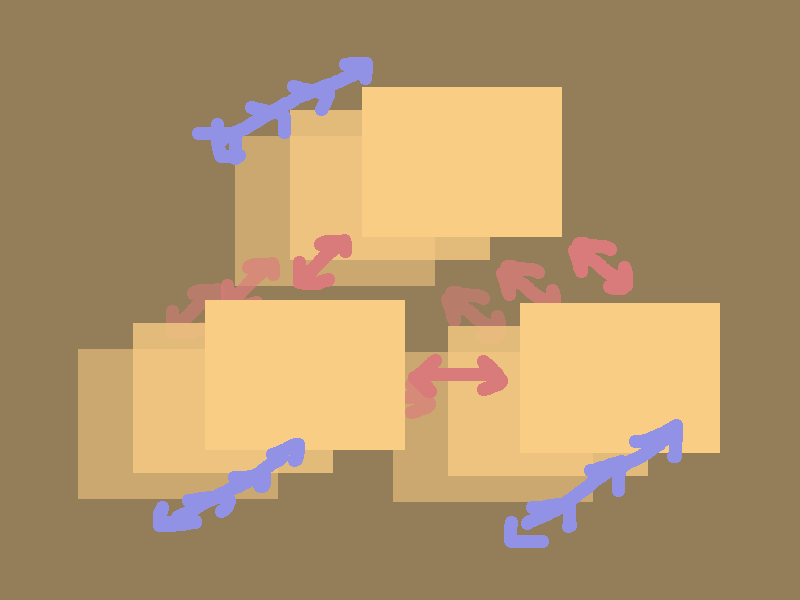
I considered keeping only one note per concept and including language-specific differences there. But then, the notes get too big. Also, I can't link to language-specific notes.
What do you guys think? Am I overcomplicating it? Or under-thinking it? How would you go about something like this?
Howdy, Stranger!
Categories
- 3K All Categories
- 153 Research & Reading
- 709 The Zettelkasten Method
- 12 Knowledge Work
- 102 Writing
- 475 Software & Gadgets
- 161 Workflows
- 734 The Archive
- 16 Plug-In Showcase
- 88 Resolved Issues
- 225 Projects Logs and Journals
- 86 Project: Zettelkasten.de
- 53 Critique my Zettel
- 181 Random
- 376 Introduce Yourselves!
Comments
I'd write one note for each concept you want to learn, eg "array", and only add examples from programming languages that you need to understand the concept.
I wouldn't try to completely document all languages in detail. Syntax is something that I look up as needed.
I wouldn't try to bring complete syntax details into my Zettelkasten system. I would only write notes about specific things that you feel you need to have reminders about. Otherwise I usually start with an internet search, like "python list syntax". You will learn which sites are worth visiting and which are worthless.
Techniques that are specific to a language can be worth capturing. I needed to determine if a Python string represents a date, and there is no way I'm going to remember that. Once I looked it up and worked out a way to do it, I wrote a note for the solution. You might want to write a note on which common languages use 1-based numbering for lists or arrays, for example.
But it would be easy to get overwhelmed by quantity, and a lot of the information is out there on the web. Generally I think it's better to only note things that are the result of some thought on your part that unifies or distinguishes some subject.
Of course, there is more the writing software than language syntax and details, much more. Language details are the least of it.
Guess I've got to take it down a notch. I'll be integrating the specifics into the general notes. Goes for solutions too. No more layer bloat Those specifics didn't hold much information anyways.
I don't like having to look things up, that's what my Zettelkasten is for. Then, it's a matter of repeated practice to remember it.
Thanks everyone!
As a software engineer, applying the Zettelkasten to software development is something I've spent quite a bit of time studying. :-)
It's not easy for me to summarize my thoughts on this.
Personally, I wouldn't reduce a Zettelkasten to a fragmented copy of a programming language's syntax reference.
Even with something relatively basic, instead of simply documenting how to declare an array in Java, I might start by investigating a question such as: Why does Java have arrays, Vectors, and ArrayLists, and when should we use one rather than another?
I can assure you that trying to explore this question thoroughly can lead to a surprisingly large number of connections and insights.
Similarly, if I wanted to learn two languages, such as Java and JavaScript, an interesting question might be: What are the implications of dynamic typing compared with static typing? This could lead me to explore not only the differences between the two languages, but also their consequences for error detection, flexibility, maintainability, and programming practices.
Or, all the underlying implications of "When to use inheritance vs composition?'", or "what are the issues of inheritance", "what is my point about the use of inheritance"
More generally, programming isn't just about syntax. It's also, and perhaps primarily, about questions to answer, problems to solve, recurring situations that give rise to patterns, recognizing abstractions (broader and more general things from specific instances), investigating and so documenting different ways of solving the same problem that may work better or worse depending on the context.
This is where I see the potential of a Zettelkasten: not simply in documenting the features of each language, but in developing an understanding of the concepts, trade-offs, and problem-solving approaches behind them.
And I think this is the background that a developer should build up over the years, thanks to Zettelkasten.
Of course, reference notes and lists can still be useful. I just wouldn't necessarily make them the main focus of the Zettelkasten, or feel compelled to create a separate note for every language-specific feature.
Here I've written another answer about:
https://forum.zettelkasten.de/discussion/3258/i-m-a-programmer-but-i-m-not-quite-sure-how-to-effectively-apply-the-zettelkasten-method-in-my-work
@ctietze wrote something about, too https://christiantietze.de/zettelkasten/
Yes, that's excellent advice, not only for programming, but for any kind of deeper learning. Ask questions, compare, find connections.
Yes, programming is much more than just typing code.
Yes. I'd like to add that it is possible to combine a zettelkasten with other tools. :-)
Much of the learning will happen somewhere else. Read books, do excercises, memorize stuff, solve real-life problems.
And a lot of actiual work happens somewhere else. Programming requires the ability to look up stuff quickly. Learn how to use references, search engines and AI. Talk to people. Explore the systems you work with and work within.
I use my zettelkasten to collect the many small pieces of information and pointers to external resources that help me understand the bigger picture and connect the other tools.
Yes. I think that zettelkasten makes most sense wirh a long-term perspective.
What I wrote doesn’t mean that you should never write code or definitions inside your Zettelkasten.
Quite the opposite.
Pieces of code work wonderfully as examples or as an implementation of solution to a problem.
And a definition works very well as an anchor for the concepts and notes pivoting around the defined term. It makes perfect sense to have an "Array" note that acts almost as a structure note for everything developed around the concept of an array.
The general principle is: a zettelkasten can contain many things, as long as that thing answers "yes" to the question, "Is this useful to me writing there? / Does this help me writing there?".
=====
Another point worth mentioning is that there's nothing preventing you from building a personal micro knowledge base for a programming language alongside your Zettelkasten, or even within the same environment. In my case, this means keeping everything in Obsidian.
Such a knowledge base might contain useful code snippets, syntax references, examples, language-specific quirks, or other information that I want to retrieve quickly when working. The same environment could also contain notes tracking development projects, task lists, and other material related to my daily work.
In technical fields, I find that the reflective and knowledge-developing core of a Zettelkasten coexist quite naturally with more factual, descriptive, and practical material. The boundaries between these uses can be quite fluid: a code example might initially be stored as a reference, but later become the starting point for an investigation; a note documenting a problem encountered in a project might lead to a more general insight worth developing and connecting to other ideas.
For example, two similar issues solved, tracked and documented into my obsisian "task manager" in two different days can make emerge a zettel that generalize the solution that make sense to have into the zettelkasten part, and I can link each other.
I don't think we necessarily need to force all these materials into the same structure or treat them as if they served the same purpose. They can coexist and complement one another, each serving its own function, while benefiting from being close at hand and, where useful, connected.
For me, the important thing is not to maintain a perfectly pure Zettelkasten, but to build an environment that supports both my day-to-day work and the development of my understanding of software.
Same here. My personal digital zettelkasten ignores many rules that others consider important. :-) For example, I embrace writing long notes that others might find too verbose or too messy.
For day-to-day work I tend to prefer collaborative tools.
I have a different rule of thumb: "Do I want to find it here?"
When I'm learning something new, I do much of the work outside the zettelkasten, because I don't need to find those notes later in the zettelkasten. However a note about "arrays" can be useful, when I want to reference it later. In that case even a very short note might do.
I don't copy manuals, but I keep a few cheatsheets that I want to find again when I need them. I don't keep every piece of code, but I keep snippets that I don't want to google again. The ZK is also a good place to write comments and link external resources for a snippet so that I can find them when I need them.
On the other hand, I use daily notes for drafts, that get deleted after a few hours.
No simple rules, plenty exceptions. ;-)
@Annabella I haven't used a Zettelkasten when I learned my first programming language and its primitives, so I have no experience for that.
Since then I do not use my Zettelkasten to capture each and every syntactical detail of a new language, though.
In 2024 I shared a piece of re-learning modern PHP fundamentals, though:
https://christiantietze.de/posts/2024/03/easing-into-language-environment-week-3-php/
The atom/molecule/organism metaphor used on a single note:
# 202403131055 § My PHP atom, molecule, organism learning journey in the Zettelkasten
#zettelkasten #php #atomic-design

I observe the progress of learning a programming language in atoms/molecules/organisms[[202403131051]] in my Zettelkasten, e.g. when I learn (or rather refresh my knowledge of) PHP for simple web applications.

## Atoms: language primitives
- destructuring associative arrays[[202403131056]] objects[[202403141409]]
    - I also have this for Ruby objects[[201809280841]] and hashes [[201706060817]]
- Anonymous objects from arrays[[202403121624]]
- `array_column` to map an array of associative arrays to a key[[202401041303]]
- promoted properties[[202403211434]]: syntactic sugar
- MySQL PHP PDO connection with UTF-8[[202401260934]]

## Molecules: idioms, patterns
- bridging `snake_case` SQL table columns to `camelCase` object attributes[[202403121633]]
- creating PHP 8 enums with pattern matching[[202312191932]]
- displaying PHP errors in the browser[[202103261559]]
- fetch single value like count or existence check from PDO[[202403231346]]

## Organisms
- project structure conventions[[202403220940]], paths and folders commonly used
I'm not writing notes for a general audience, but me, so I take 'array' and 'enum' for granted, but 'destructuring associative arrays' is something I need to think of and remember with a bit of effort.
However, if you have absolutely no clue what a condition is supposed to be, what data structures are, how an array is one, what its features are, etc. then it's just as well to capture everything you learn about this.
As Luhmann pointed out in his metaphor of a septic tank, some things in you Zettelkasten tank float on top, others diffuse to the bottom, and the power of a Zettelkasten is that the sediment on the bottom doesn't disturb the increasing clarity of the rest.
So if you find you have a grasp on things, great, don't make it an extra effort to write about it; that becomes a chore too easily.
If you have trouble connecting the terms and dots, great, write more about it with the express goal to make these terms stick and getting used to write sentences with them to connect the dots.
Author at Zettelkasten.de • https://christiantietze.de/
On "a matter of repeated practice to remember it": what worked for me with programming concepts is turning each concept note into two or three questions I can't answer by recognition, like "why would you pick an ArrayList over an array here?", and coming back to them a few days later. If I can't answer, that's the note to reread.
I work on Eigma, which makes those questions from your notes and schedules them, if you'd rather not do it by hand. Disclosure: I'm on the team. Either way, one note per concept with only the examples you need sounds like the right call.
Although I do write some software, I haven't tried to bring programming concepts into my Zettelkasten except for a few specific constructions and command syntax notes. I think I would create a note for an important concept, and list particulars for various languages in that note. If the note got too large I would split it up, but not necessarily breaking out a note per language. That's a question to be discovered through experience, I think. You can always make changes when you think you really need them.
My Zettelkasten system is based on an outliner, and here is a first try at (part of) an outline that seems reasonable. The outline structure itself provides relationships.
Programming Concepts
    General
        Arrays
            Lists
        Console Output
        File I/O
        Memory Management
        Numbers
            Binary
                Integer
                Floating Point
            Decimal
            Arbitrary Precision
        Pointers
        Strings
            Concatenating
            Formatting
    Language Specific
No doubt the notes themselves will start to grow links too. For example, a note on flow management syntax could end up with links to language-specific notes once it got too large to add any more languages.