Searching for Add Ons to my App Inventory

Dear Zettlers,
I am putting together a test battery with the following aims:
- Since my clients come from a very diverse background of Apps and Workflows (the most extreme case might be a finance manager from Abu Dabi Investment Authority asking to help with a Zettelkasten-esque collaboration tool to organise presentations) I have to keep my eye on all kinds of apps and behaviors. So, I like to expose myself to quite many apps to have a feel for each app and its unique nudges and design quirks.
- Slowly, I accumulate design patterns for knowledge bases (of which the Zettelkasten is a type) and since they cannot be developed without their implementations in mind, I do research on how apps seem to make decisions. (Some of them will be presented soon. Article is already written and just has to go through Christian's quality control)
- I tried to make Obsidian work as a catch-the-rest app, since I don't like to abuse my Zettelkasten (for example: Keeping client files), I miss a touch of complexity in Things 3, my second brain is too simple (managed with TaskPaper) also, and I miss some organisational features in the iA Writer. So, I will try a pure One-Thing-Well approach.
There three types of apps that I will test:
- Apps that give me both organisational power to manage skripts, client files and has a nice interface. Bear is so far my favorite based on its clean interface. But it doesn't have a typewriter mode which is quite surprising.
- Apps that are writing forcers. The Cold Turkey Writer is here my favorite and the single app that I have on my list.
- Story Writing, both short and long stories. No favorite yet.
These are the apps on my list:
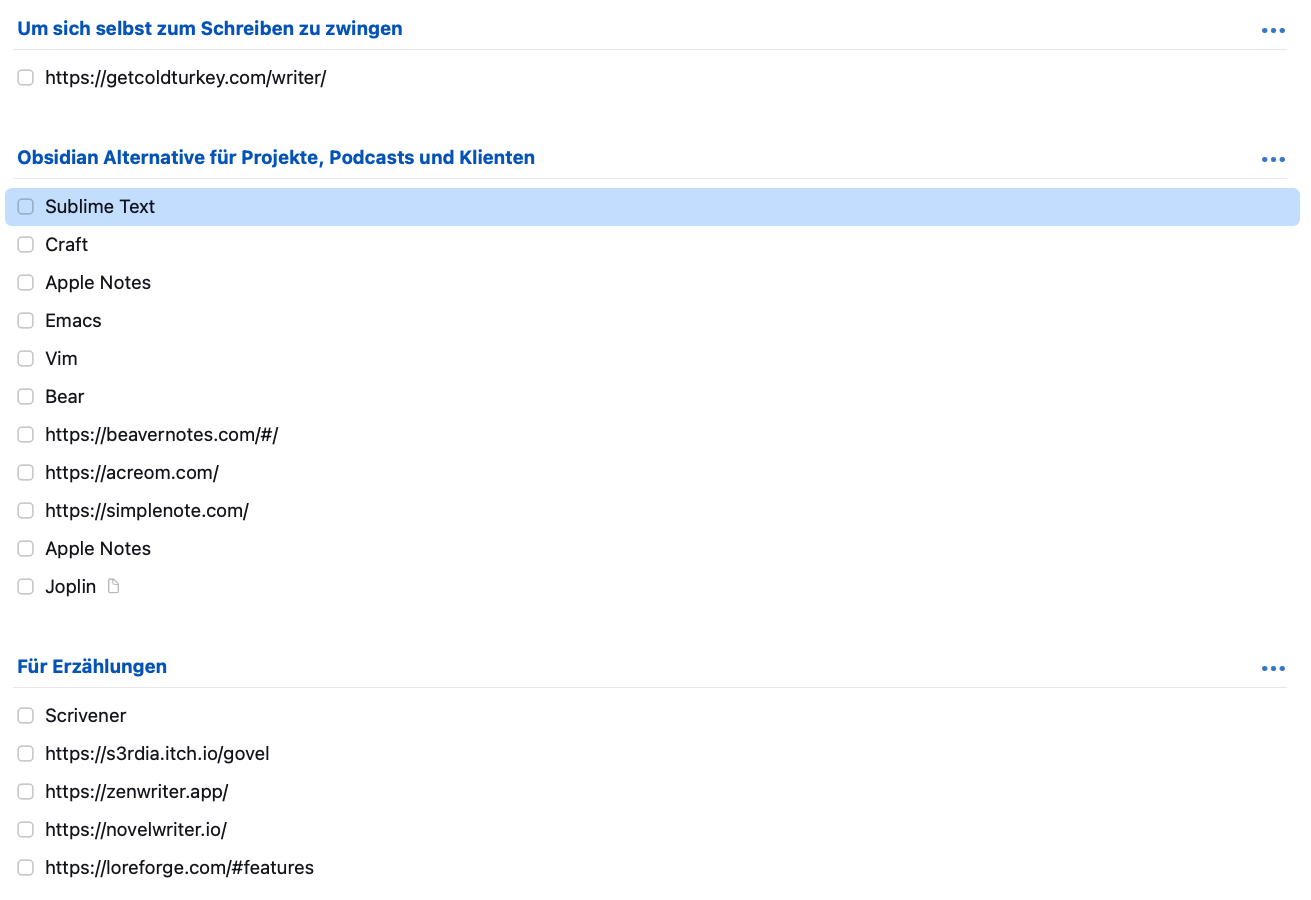
Do you have any suggestions? Did I miss any good candidate?
I am a Zettler
Howdy, Stranger!
Comments
You can add outliner apps like Logseq or Roam. They have a different logic that has its own fans. Plus Tana. I don't think Tanarians really are Zettlers but it has also its own category.
Selen. Psychology freak.
“You cannot buy the revolution. You cannot make the revolution. You can only be the revolution. It is in your spirit, or it is nowhere.”
― Ursula K. Le Guin
I'm having fun with OmniOutliner.
OmniOutliner is a powerful app, but probably became marginalized when OmniGroup let it go many years without significant development. OmniOutliner 6 is in public beta, so there are finally signs of life.
Because you can focus on any topic or subtopic, hiding everything else, you can have more than an outline in an OmniOutliner (OO) file. I'm experimenting with OO's Javascript automation.
OO lets you add columns for extra fields on every item in the outline.
First, I add a cross reference column.
Then, I add a Research topic at the end of my outline.
I write the outline as I normally would, adding keywords for things of interest in the cross reference column.
Notes about stuff go as child items in the Research topic, also with keywords in the cross reference column.
Now, when I'm writing, I can click on an outline row and run my Javascript.
That hides everything in the outline except the row I selected and its child rows, exactly like OO's focus feature.
Plus, the Javascript also adds everything from the Research folder matching any of the keywords found in all of the selected outline rows.
Basically, click on a chapter, see the chapter and its scenes in the outline plus any notes that relate.
@Amontillado I played with the OmniOutliner a bit. The column feature is very intriguing. However, I like the output, but not the input. It feels clunky. I am used to Bike. It is so smooth and by far the best outliner I ever used.
How would you compare them?
I am a Zettler
Hi, Sascha. In Bike, you can just type and create an outline, promoting and demoting items with single keystrokes.
In OmniOutliner, you can just type and create an outline, promoting and demoting items with single keystrokes.
In other words, no difference, but I think I can understand where the perception comes from.
There are quirks once you go beyond simple outlines. They are containable quirks, but they are there.
The weakest feature in OmniOutliner is the way row styles work. Very arcane and undocumented.
But, it will do some cool things, too.
I like being able to do things like export an OmniOutliner file as a CSV which will load without modification into Aeon Timeline, picking up OO columns for dates, participants, and other attributes.
The Javascript automation is really nice. I think OmniFocus started out as Javascript running in OmniOutliner.
Without doubt, the consensus is that OmniOutliner is cumbersome and I admit I had to make my peace with it. At the end of that journey, it does nice things for me that I don't think any other outliner would do. Apps like Obsidian or Notion will, but I think OmniOutliner is actually less fussy.
For projects: Devonthink
For projects/calendar/notes: Workflowy
For writing: Paper
I've used Devonthink for more than 20 years - completely reliable, deep capability and well designed. It can be quite visually complex, though, which means I prefer The Archive for notes, with Devonthink sitting behind it to catch everything else. That's what it excels at - catching everything, and finding it again when you need it.
Workflowy stalled for many years, but in 2025 its devs have poured a lot of love into it. Once you go behind its apparently simple interface, it's immensely capable. It drives my days.
Paper is unusual, opinionated and ludicrously expensive, but also the most satisfying writing app I've ever used (I've lived mostly by writing for 30 years). It's a work of pure craftsmanship. Everything has been re-thought, and the results are 👌.
Also:
Capacities is a terrific app, lots of good thought invested in it and a clean design. I'd like to support it, but I'm happy with my current tools.
Antinote is a scratchpad "for quick experiments", but it takes 'scratchpad' to a new level of functionality. I get a little zing of delight every time I use it.
Well, Notion exists and could be used for this; if that's the right direction, here's a list of alternatives including AnyType that works offline: https://alternativeto.net/software/notion/
Author at Zettelkasten.de • https://christiantietze.de/
@Sascha If you like using Paper for writing, there is an alternative with similar capabilities and lower cost called Atticus
Sometimes it's worthwhile to look at existing tools and see new use cases. Tonight I got familiar with a feature I've underutilized.
It's crazy to suggest, but here goes. Mellel can function as a nice two pane outliner. If you turn on the Auto-Indent feature, typing an outline in Mellel is very close to exactly how you'd create the same outline in Bike. I've looked at this in the past but missed some details that make quite a difference.
Command-[ and Command-] promote and demote Mellel topic levels. Command-' toggles in and out of a topic's note. If you set up indentations in your Auto-titles, text indentation follows a topic's level.
If you're not in a topic's note, which is just a series of regular paragraphs to Mellel, the return key adds another topic, which is an Auto-Title in Mellel-speak.
You have to use your mouse to rearrange topics, but you can also do things like add "invisible" comments or use text boxes as sidebar commentary.
If you include a catch-all topic for research, you can add cross references between your outline topics and notes. If you want your outline to include a bibliography, nothing is stopping you.
I'm moving a 20 topic outline with a hundred or more research notes from DEVONthink to a Mellel outline as an experiment. A Mellel style set intended for outlining is helping quite a bit. That was extra trouble to set up, but it's set-and-forget and it's easier than CSS.
Bike is a great outliner. The same environment for both outlining and drafting a manuscript is pretty nice, too.
Ulysses is a really worthy Scrivener alternative. It's a little bit to Scrivener what Bear is to Obsidian: opinionated, simple, but you have to buy into their way of doing things because you will not be able to really change how it works. Which, depending on your approach, may be a boon.
There are also a dozen web apps in this space, which I never count because writing is OFFLINE, but I can dig out the names if you want to consider them. Several are actually quite full featured.
In the Zettelkasten app space, I have liked Amplenote too, which should appeal to Windows and Android users who like a powerful offer but for whom Obsidian is too complex.
"A writer should write what he has to say and not speak it." - Ernest Hemingway
PKM: Bear, tasks: OmniFocus, production: Scrivener / Ableton Live.
@Amontillado Thanks for mentioning Mellel - I have it, and have used it in the past, but haven't explored its capabilities properly. I'm going to do that, having read your post.
@GeoEng51 I'm writing a companion to Mellel's User Guide. That is probably pretentious of me since I'm still uncovering potential in Mellel.
The Mellel User Guide is masterfully clear regarding what Mellel is. I found I needed to discover why things are the way they are in Mellel beyond the "what" covered in the guide.
It also seems to me Mellel's steep learning curve is more a matter of perception and terminology than actual difficulty.
For instance, Mellel's streams are an easy concept veiled by a mysterious name.
A Mellel stream is a class of thing with a counter shared by every instance of the things. If you have Acts, Chapters, and Scenes, you have three streams. Acts, Chapters, and Scenes all may need to have numbers. Each of the three has its own counter. That's all there is to streams.
I don't know why Mellel calls them streams. I also don't know what I'd call them.
If it's OK, I'll post a link to epub and PDF versions of my Mellel companion when it's finished. I'll publish on Kindle, but if any here are interested you're welcome to it. You've put up with my lurking, I owe you one!
I'm about 17,000 words into the project. I anticipate maybe 25,000 words will tell everything I have to say. It will be finished soon.
If you have questions about Mellel, that will help me understand what to write about. I created a ridiculous throwaway email address for such inquiries, genomes-dollies-9i at icloud dot com.
Yeah, I know. "Dollies." Why Apple stuck that in a hide-my-email address for me is a mystery. A bigger mystery is why I didn't notice.
Oh, well, nothing wrong with dollies.
This is one of the apps that I am considering to create the PDF for print and the ebook.
Many thanks for the suggestion. Do you have experience with Mellel vs Atticus? Or Mellel vs Pages?
It looks like a very nice candidate to get a print ready PDF.
I think I improved my environment a lot already by changing my beloved font Lato to Avenir. Lato is perfect for my Zettelkasten, but for writing, Avenir is way better. I think this is part of the reason why I feel pulled away from the iA Writer.
I was a Ulysses user before they switched to a subscription model.
Thanks, but I share your opinion. I would never rely on an online app.
Amplenote seems to be geared towards a workflow aimed at task management from notes?
I am a Zettler
It has note taking capabilities on par with Evernote. My read is that they took that angle to differentiate themselves from the competition.
By the way, if you like the Avenir font, the Bear Sans UI variation specifically designed for Bear is splendid. (Can be extracted from the app package on Mac.)
"A writer should write what he has to say and not speak it." - Ernest Hemingway
PKM: Bear, tasks: OmniFocus, production: Scrivener / Ableton Live.
I've never used Atticus.
Mellel's typography is top notch. That's one of the things that made me give it a second look, many years ago. A Nisus document and a Mellel document side-by-side were subtly different. Mellel always had an edge.
It doesn't use TextKit, or whatever it's called, so rendering is different than most Apple apps. Not in any major way. If you see the difference it's just that Mellel's output is cleaner in some hard to define way.
Pages is a surprisingly nice application. It looks like it doesn't do much. That's perception, not reality. It is a full featured word processor capable of creating books. If it were the only word processor I was allowed to use, I wouldn't be materially harmed. Grumpy, but not harmed.
The mini-desktop publishing mode Pages has is great. It can't keep up with Affinity, but for light use it's a nice resource.
Pages loses me in styles, though. The only way to save styles is in a template. The only way to load styles is to open a template.
In other words, I can't swap the styles in my document with a different set. A paragraph style doesn't feed off a character style, so you can't have several different paragraph styles with an enforced common character style.
A character style in Pages has no paragraph settings. A paragraph style has the full suite of character settings plus paragraph attributes.
Mellel has the best style support I've seen. You can swap a document's style set out for another one. It's kind of like what Scrivener calls a compile.
Style sets can be global, where any document can load or modify the style set, or style sets can be local to a single document.
If I use a global style set and share the document with someone who doesn't have my global style set installed, no problem. A cached copy of the style set always rides along inside documents. The other guy sees a document-local style set in use, I see my global.
A global style set can be "forked" like a git project. Mellel's styles are cool.
I also like Mellel's document format, which is zipped xml plus resources like images. The xml is transparent.
The first time I looked at a Mellel document's structure, I spent an afternoon. At the end of the day I had a Python script that would read a CSV and a Mellel document, mail merging to multiple Mellel documents. That was without support or Googling. Mellel itself wasn't used in my mail merge script.
It's not future proof like plain text. For my purposes, it's future proof enough. I don't need Mellel to read Mellel documents.
I have to pay to have the desktop app. A nono for me.
I am sold. I will give Mellel an honest try!
I am a Zettler
I think I'm within a few weeks of finishing my companion to Mellel's guide. It would be an honor to send a copy to you or anyone within earshot.
It goes through things like how to "fork" an existing style set.
The Mellel guide just touches on how searching works, which I kind of understand. It's regex with a friendly point-and-click front end. Even when it's easy to use, regular expressions can be hard to explain.
I go through some of that, as well.
Fun fact - regular expressions were not invented in the early days of Unix. They date back to Princeton mathematician Stephen Kleene (pronounced CLAY-knee) in 1951. He was working on regular languages, which are finite languages that can be described with regular expressions.
You could say Kleene was a regular guy, I suppose.
Anyway, he needed a syntax to codify patterns in McCulloch-Pitts neural networks and the regex we know and love came from that. My understanding is McCulloch-Pitts networks are like networks of truth tables.
Who knew? AI really is everywhere, even back before Sputnik flew.
Hi - I'm interested - please send a copy. Let me know when it is ready via the built-in messaging service, and I'll send you my email. Thanks!!
I'll be happy to read it and give you some commentary. I played with it and while it was not enough for me to get to a point at which I feel confident of creating a book with it, I will definitely use it to create a longer e-book first (for health and fitness) and then decide whether it will be the app of choice for the book afterwards.
For the English translation of the Zettelkasten Method, I think Pages will be sufficient and with a less step learning curve as I am already using it for short documents.
I am a Zettler
Indeed. Always use what works. Mellel offers some ebook control not seen in every ebook utility. You get control over the epub "spine".
Sigh. One more thing to add to my treatise. It was supposed to be short.
@Amontillado I am wondering if Mellel would be a good choice for incremental writing.
Basically, I want to be able to add small chunks of text over a long period of time and then export a PDF as versions.
I am a Zettler
I would do that, but I've guzzled the koolaid. Any of the systems designed around separate files in close formation might be more to your taste - Scrivener, Ulysses, things like that. Probably any word processor would support incremental writing, as long as you could get along without demarkation between what you wrote before and what you're writing now.
A Section in Mellel-speak is a region with a column setup including background color. Line numbering options are also tied to Sections. You can block a document into Sections with different backgrounds. That would provide visual difference, and there is a trick that would let you turn the background colors on or off at a mouse click to keep them from interfering with your output.
Mellel's developer has said the ability to selectively output chunks of the document along with display by section or chapter are planned. He's also expressed excitement about those two ideas, so my guess is those features will appear before long.
Those features will make Mellel somewhat Scrivener-esque. I'm sure I'll use the selective output feature to keep notes embedded within a document. That can be done with document comments, but they can't be edited in a full window.
It would be fascinating to hear your solution as it evolves.
I found out that Mellel just integrates with Bookends? I think this is a no for me. Or is there another way to manage citations?
I am a Zettler
Bookends and Sente are handled automatically in Mellel. If you wanted to use Zotero, for example, you would need to manually copy and paste. I can see how that would be a deal killer.
I've played with citations in the past, mostly to learn how they work. My current project will benefit from them, so I'm finally using Bookends in a real setting.
The integration is very good for when Bookends is a possibility. You can map the character styling Bookends offers to Mellel character styles in a map table, and Mellel supports either per-chapter bibliographies or at the end of the document.
In Mellel with Bookends, you use an insert function to add a citation placeholder. Any time you want to update your citations and create bibliographies, you use a scan function. There is also an un-scan.
I'm the wrong person to ask about whether that is much use or not. Bookends is the only citation manager I've ever used - and not very much, at that.
Mellel's own marketing sometimes includes the phrase "Mellel isn't for everyone." That's completely true.
For me, I have to keep reminding myself it's just a word processor. I write as effectively in Vim as in Mellel. If I don't remember that, Mellel starts feeling like a massive forge furnace for words of power hidden deep in Mount Doom. Or something like that.