What's happening in your Zettelkasten this month, September 2026?

The idea: a general chat about what we're working on currently.
---
Currently I have found a nice balance between reworking older notes and adding new ones. Two experiments have turned out well:
- I've been running a tagging experiment for a while, and now I'm happy enough with it that I know I'll keep it, or something like it. I'll make a separate post about it another time.
- I've been replacing lists of links in structure notes, with a flowing text which includes the links but puts them in context for an overall picture.
An example of both is here:
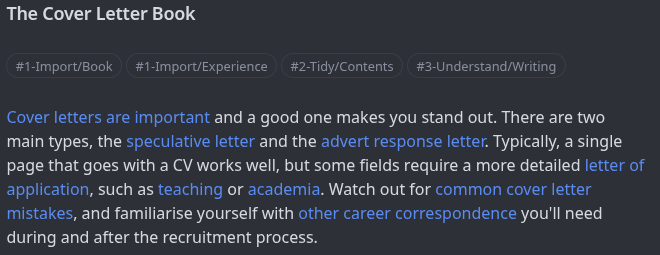
The workflow tagging system I've used is 'Import, Tidy, Understand, Export', with further nested tags depending on the note details. I'll expand on that another time.
In the past, there would've been a list of links here, which themselves have further links to other notes. But weaving them together into a mini-text is just so much more enjoyable for me. It's nicer to look at, and turns the list of links into a mini-note in itself.
I'm definitely keeping the 'flowing text' structure note as the replacement for the list-style structure note. I'll keep experimenting with workflow-based tagging to see how I can improve it. I'm not completely satisfied with that just yet, but I'll use something along those lines
---
And how is it going for the rest of you? What's happening in your Zettelkasten this month?
Howdy, Stranger!
Categories
- 3K All Categories
- 153 Research & Reading
- 708 The Zettelkasten Method
- 12 Knowledge Work
- 102 Writing
- 475 Software & Gadgets
- 161 Workflows
- 734 The Archive
- 16 Plug-In Showcase
- 88 Resolved Issues
- 225 Projects Logs and Journals
- 86 Project: Zettelkasten.de
- 53 Critique my Zettel
- 181 Random
- 376 Introduce Yourselves!
Comments
In my zettelkasten The Archive, it occurred to me that a compilation of essential diagrams in chemistry might make for my first book. Quite some material was there already, more is now growing and finding connections. Let's see where this goes.
In addition, I have installed Obsidian to check it out. So far, I need to figure out where that vault is going to go. Currently, The Archive is for virtually everything (in English), Obsidian is (in German) about psychological aspects in corporate life such as negotiations, change management, HR issues and the like. I might eventually merge the .md-files.
How to zettel for stellar revelations? What a fantastic journey!
I like your idea #2 above and the example you gave. It makes the structure note a lot friendlier, although I also like to show links in bullets and sub-bullets. You can do one or the other, but not both. However, I think I'll give your narrative approach a try on some of my structure notes.
@Marcel_Liauw I've experimented with using different apps for different Zettelkasten purposes in the past. This can work well, but over time, I've found it's unnecessary to have separate ZKs, and if one finds the right software, to use more than one app. One ZK can accommodate as many overarching purposes and topics as you want - everything from personal ideas and memories to technical topics to news to politics to daily journal entries to calendar entries, etc., etc. Each major topic might occupy a different "space" within your ZK, but multiple "spaces" can coexist happily. You may find the density of your links higher within each space and sparser between spaces, but that's also OK, and those inter-space links are gold.
Anyway, my only intent here was to say you shouldn't feel obligated to have multiple ZKs and/or use multiple apps to contain your ZK. You might choose to do the latter, to get complementary features, and if you design your zettel format appropriately, you can access the same set of text files with multiple apps, (the trick is to get links to work consistently between apps).
Parenthetically, it's also nice to be able to migrate your Zettelkasten from one app (that you really like now) to another app (that you really like in the future). This may require changes to the format of the zettel title, UID and/or links. We're talking about text files, so the change in format is pretty straightforward, and some rudimentary Python skills suffice to make the necessary changes.
Number two(2) for sure, I started doing the same "in-line" links in my system a while ago. I used to have a list of links at the bottom of my notes, but the integration within the note helps assist with the context. However, I mostly use it for referencing back to a bib note.
One thing I started doing a year ago was adding a "# Journal" or "# Dialog" at the bottom of every note. That way when I discover the note again in the future, I can log my dialog (talking to my note) each time. Usually in bulleted form. i.e.,
- 2026-09-02 I thought this thought when reading this. It reminds me of <link to other note>.My connections usually stem from this dialog. It is my way of creating a "Folgezettel" thought train without the forcing of generating a "Parent-child" relationship. I use the The Archive's default ID system, which also helps deter a forced connection. Plus I don't believe in using back-link connections, only forward thoughts from the current zettel.Excellent idea. This kind of log would solve several problems of mine:
Thanks for the inspiration!
As a rookie (two weeks), I wonder if inspiring ideas such as in this thread are compiled somewhere, or if I should sift through the forum (maybe the "What's happening..." threads first).
How to zettel for stellar revelations? What a fantastic journey!
On a smaller note, I made a lookup-table for special characters in The Archive. When looking for any, I can either look which option-shift-key to take for a pi or a square bracket, or just copy it from there. Probably, most of you have something similar or know how to solve this.
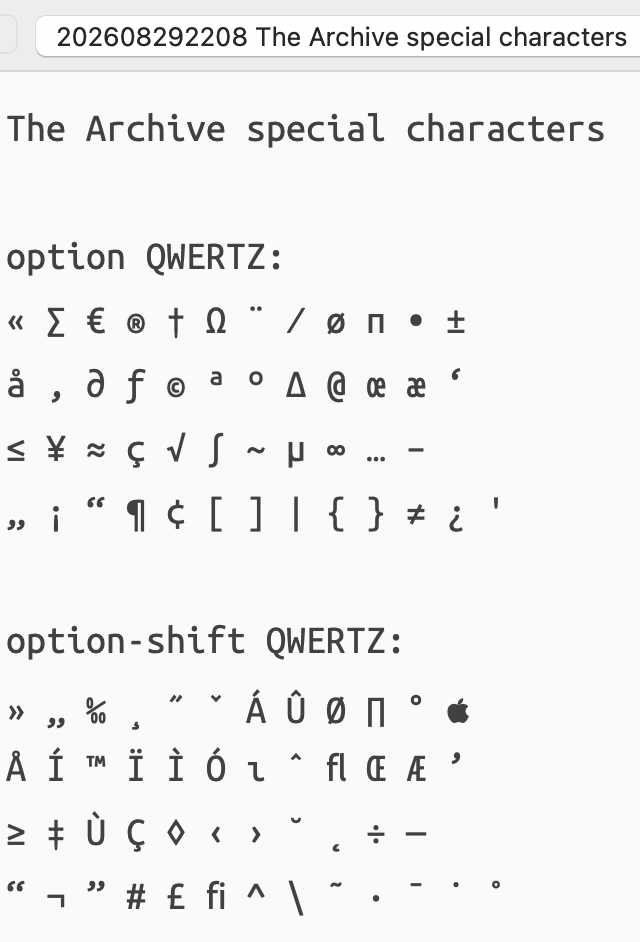
(Note that for some of you, it would read QWERTY...)
How to zettel for stellar revelations? What a fantastic journey!
I also focused only on forward thoughts, but I noticed that some things just naturally have a forward thought back to some part of the original source. I still don't have any automated backlink system, but I'm happy to have a 'forward-pointing' backlink when it makes sense.
I think the important thing is to not force anything, and instead just let our system evolve naturally in the way we need it to.
I agree, after trying various apps myself, and have separate vaults, in the long-run I brought everthing together into one vault in one app. It just saves time and makes connections possible that you otherwise might not have found.
Having said that, I think trying different apps and different ways or organising things is actually a useful thing to do in the earlier stages. It helps you to figure out what you want and what you don't want. For anyone starting out I would tell them to try different apps and organising methods so that they understand what's important to them when they later bring everything together.
When I first discovered the forum, it took a while to go through some of the older posts to find useful ideas. The forum has been around so long now that there's really quite a lot of content, so it's something I could only do very gradually over time... and I still couldn't read every post and comment.
I'm not aware that anyone has tried to combine all the various ideas into some sort of compendium, that would be quite a project. Maybe if someone has retired or has another reason why they have free time, it could be an excellent book project!
I agree with the point of not forcing. My system makes it trivial to insert a backlink but only if the user wants to.
One advantage to having a backlink in a note is that I can easily show the neighborhood around the target of that backlink. This makes it easier to know if I'm actually interested in pursuing the link or not.
There's also value in seeing what other notes are interested in this one, and backlinks make constructing this display easier.
I'm not aware of such a compilation. However, I often use Google to search the forum for relevant posts. eg: "object tags" site:forum.zettelkasten.de
Some Google searches for tips & tricks that produced interesting results:
Note that these queries don't use quotation marks. They are not searching for an exact phrase as suggested in my previous comment. In this case Google is supposed to take some liberties in interpreting the query.
The next step is to narrow the searches down. For example by excluding or requiring keywords, adding a date, etc.:
TL;DR: I prefer Google to DuckDuckGo when searching old forum posts.
I find searching old forum posts with ChatGPT gives better and more satisfying results than using Google or DuckDuckGo. I realize the latter search engines are also using AI, but they seem "clunkier" and less capable.
I get very different results when searching with ChatGPT (find posts on forum.zettelkasten.de that discuss alternatives to version control) and Google (site:forum.zettelkasten.de alternative "version control").
My current approach is to use both, chatbots and Google search, because the results are so different.
Now that's something I haven't thought of, asking an AI to search this forum! I've experimented with different AI's but prefer one with some privacy built in if possible. Outside of work I use Lumo for privacy reasons, and it's often not bad, but I do use one of the major ones at work because I've got no expectation of privacy there.
I'll have to experiment with asking Lumo, or even Brave Browser AI (Leo AI), about the forum and will include it in a post in the future if the results are interesting.
I asked Lumo to write a prompt. After some experimentation we got here (replace "[TOPIC]" with the actual topic you're interested in):
Search forum.zettelkasten.de for highly regarded threads on [TOPIC]. Rely on Google with site:forum.zettelkasten.de plus topic keywords like "workflow", "how I", "my system". For each thread found, report: title, URL, author, reply count, and the concrete tips given. Exclude discussions in "Resolved Issues" and software-specific bug threads unless relevant.
I asked Lumo to optimize the prompt. Then I tweaked it a bit. The prompt is now much longer:
Role: Act as a research assistant with web search access.
Goal: Find highly regarded threads on [TOPIC] in the forum at forum.zettelkasten.de and extract practical advice from them.
Method :
site:forum.zettelkasten.de [TOPIC] ("workflow" OR "how I" OR "my system" OR "my Zettelkasten").Per thread, report:
Inclusion/exclusion criteria:
Output format: A nested list. Use thread title as main result. Add URL, author, replies, key tips as sublist. Sort by perceived quality/regard (replies, citations, engagement), highest first.
Constraints:
I tested the prompt in Lumo with the topic "how to track the evolution of a zettel without version control" and got 5 excellent threads as a result.
How do y'all prompt your AIs to get results that are better than a direct Google search or a generic prompt?
(Having stayed in Oklahoma City and Houston for two years, you had me with "y'all")
While still rather using Startpage or The Archive's DuckDuckGo as conventional search engines, I check for strings such as "I stole", "I cherish", "inspired" and the like.
OK, in times of AI, those were maybe even less than my two cents. Maybe one cent.
How to zettel for stellar revelations? What a fantastic journey!
My Zettelkasten is turning into a Lab notebook to track projects.
Zettel GitHub. Zettel Wiki Erdős #2. Problems worthy of attack prove their worth by hitting back. -- Piet Hein. PROBLEMS. Grooks, 1966. CC BY-SA 4.0.
I've printed out a rough draft and then a final draft of my "Some Life Stories" book, which was mostly derived from personal history entries in my Zettelkasten. There are 54 stories, written one a week under a (gift) subscription to Storyworth, who also printed the rough draft (hard cover) book with b&w photos. Over the last 6 months, I've tightened up the format and had some family members read the book, make suggestions and one daughter edited the text. Then it was time to print a final draft of the book, with colour photos, which I just received from Blurb. There are still some minor edits to make and tweaks to the formatting. I hope to get about 10 copies printed off in a month or so, in time to ship out to family members at Christmas. Overall, it's been a fun and interesting ride. If anyone wants more details on any aspect of the process, feel free to ask.
Inspired by @GeoEng51 talking about his personal writing, I wanted to share some unexpected fruits from my zettelkasten. I share this by way of reaffirming the speculative work done in this community. This theorizing really does help to generate output (in my case in the form of published/publishable work). For the more classic case of zettelkasten output (and I think I already mentioned this earlier on here), I got to publish my academic book on the history of blood and kinship earlier this year. That book was completely carried by this method from conception to completion.
But what @GeoEng51 inspired me to share are the more unorthodox products of my zettelkasten. The past year on substack I have been publishing a series of pseudo-fictional but actually auto-biographical (the kind I think @Will might also be interested in) on substack which has resulted in a silly zine, some videos, and a chapbook actually coming out with a press in two months. The premise is one guy named Franklin living in Franklin, Tennessee writes letters to another guy named Franklin living in Franklin, Kentucky. We're calling it Letters from the Other Franklin, and we will be publishing it as a book after another year or so of writing.
I like the sentiment of @ZettelDistraction. The zettelkasten has become an experimental lab notebook for my life. Those lab notes have just taken the form of thinly-veiled "fiction."
Speaking of fiction, I am also serializing a bureaucratic sci-fi novel that I have written with a friend (we're calling it a _sky_berpunk novel) on substack all this year as well. All free.
All this is from the zettelkasten, fiction and non-fiction.
I don't mean for this to be an ad. There is nothing for me to profit here. I sincerely share it in good faith for what this community works so hard to produce. You all have helped me and continue to help me think through these very real speculative problems in ways nobody else has the courage to brave. I've been lurking a lot lately, but that's mostly because the zettelkasten has given me so much (good) work to be doing that I can barely keep up (I'm not).
I just watched someones YT video about the notebook habit they have after previous Lab work. I've never worked in a Lab myself, but if I get the chance to visit one I'd like to.
Do you have particular Lab note-taking techniques that work well with a Zettelkasten?
Someday in the future... this book will turn out to be a treasure for someone in a following generation. I've tried learning about people in my family before my time, but so much has been lost to history. I would've loved to have a book like this about the grandparents on one side who died before I was born, or the great-grandparents and other relatives who I never knew. Having their stories would've been such a consolation compared to having nothing.
For several weeks now, a significant part of my zettelkasten has been dedicated to learning how to run better.
I really like how all the material developed is integrating over time into the same web of thoughts, according to four main directions: learning principles from third-party sources, conversations (and even discussions) with other runners, observations from my own running sessions, and personal reflections too.
A use case that demonstrates several possible inputs.
Not really--these are notes to track various AI-assisted mathematics and Lean automation projects. (The commercially available flagship models need sentence-by-sentence correction, at least so far. That may change in the near future.) There are enough of these projects that I have to track my progress with each one. Even running two Lean proof-assistant verifications is enough to cause hopeless confusion without tracking them. These notes help when my system reboots for upgrades, to state only one reason. Likewise I have a program for studying mathematics, given AI developments (not ready for prime time) and I keep lab notes about the progress.
Sorry, the rest is hidden, but it follows my conventions.
But here's what can happen while you are auditing your own results: I found that two published papers in established journals have invalid constructions, so I cannot rely on them. I have been unable to locate corrections in the literature or online.
Zettel GitHub. Zettel Wiki Erdős #2. Problems worthy of attack prove their worth by hitting back. -- Piet Hein. PROBLEMS. Grooks, 1966. CC BY-SA 4.0.
I'm in a huge mission to turn the whole Zettelkasten practice into concept mapping using Tinderbox. I have been trying to implement the traditional method for 3-4 years now and abandoned every time, hated writing linearly, found no thinking merits in "visual" zettelkasten because it's not enough deep processing. Concept mapping seems like a plausible solution.
To map the landscape of why I am like this, right now I am dealing with dyslexia literature. Apparently dyslexia is more than what is thought generally. It is rooted in largely disconnected brain networks, and problems in procedural memory, making it a broader problem.
Then I will read about metacognitive processes and executive functioning, attention allocation, working memory, and distributed & extended cognition.
The goal is to help non-linear thinkers like me to adapt vertical thinking abilities and prepare a cognitive guide for Zettelkasten.
Selen
@c4lvorias Do you mean you want to change your ZK practice into concept mapping, or everyone's ZK practice? The former sounds like a significant challenge; the latter an impossibility (given human nature and the wide variety of practices and opinions expressed on this forum).
@GeoEng51 No just mine. I find it significantly easier. Really excited these days.
Selen
Concept maps are something I haven't had much experience with, so I'm curious to see how it turns out. I'm also not familiar with the Novak books, but I'll read the main concept maps one so I can learn about it. Thanks for mentioning it in your other post, I'm always interested in book recommendations.
If it turns out well, you might inspire others here to add it as a tool in their toolbox.